

Practical guide to building, deploying, and monitoring AI agents for developer workflows, focusing on frameworks, costs, and safety.
AI agents are reshaping development workflows in 2026. These systems are autonomous, capable of breaking down goals into tasks, using tools, and iterating until objectives are met. Unlike chatbots, AI agents operate in continuous loops, integrating reasoning, memory, and planning. By January 2026, 57% of AI-driven organizations use agentic systems for tasks like AI-powered DevOps trends, code reviews, and research workflows.
Key highlights include:
- AI Agent Components: LLMs for decision-making, tools for execution, memory for context, and planning for task management.
- Use Cases: Automated testing, debugging, pull request reviews, DevOps monitoring, and information retrieval. using tools like RAGFlow
- Frameworks: LangGraph (stateful workflows), CrewAI (team-based tasks), and OpenAI Agents SDK (OpenAI-specific).
- Cost Management: Local LLMs like Llama 3 reduce expenses, while advanced models handle complex reasoning.
- Production Challenges: Reliability, security, and cost control are critical, with tools like LangSmith and Arize Phoenix aiding monitoring.
AI agents thrive when paired with clear goals, structured workflows, and robust monitoring. Start small, focus on specific tasks, and scale as needed to maximize efficiency and control costs.
Key Use Cases for AI Agents in Development
How AI Agents Improve Developer Workflows
AI agents are transforming how developers handle time-intensive tasks. They take on responsibilities like managing sprawling codebases and conducting pull request (PR) reviews. By navigating through large codebases, analyzing requirements, generating code, and performing automated PR reviews with static analysis and fix recommendations, these agents streamline workflows significantly .
Another game-changer is automated testing and debugging. AI agents can generate tests, execute them, and refine the code until all tests pass - dramatically shortening the quality assurance (QA) process . For instance, tools like Cursor highlight the potential of this technology. Cursor’s agent mode can execute terminal commands, read files, and track edits across a session, making it a valuable tool for developers .
Agents also shine when it comes to retrieving information using Retrieval-Augmented Generation (RAG). They can produce updated documentation, ensuring technical content stays accurate and up-to-date without requiring manual intervention .
"The real product advantage now is workflow intelligence." - Raju Dandigam
Beyond these workflow improvements, AI agents are proving their worth in automating routine processes in development environments.
Automating and Optimizing Repetitive Tasks
AI agents are particularly effective in automating DevOps tasks. They can monitor systems, detect anomalies, and handle auto-remediation tasks like updating configuration files, summarizing logs, and flagging potential issues - all without waiting for human input .
A key enabler for this is the ReAct loop, which allows agents to handle multi-step workflows by thinking, acting, and iterating in a seamless cycle. Additionally, technologies like MCP (Modular Command Protocol) enable integration with external systems without needing hardcoded solutions .
For more complex workflows, multi-agent specialization offers an efficient approach. By assigning specific roles - such as Researcher, Coder, or Reviewer - and connecting them through patterns like Coordinator, Pipeline, or Debate, teams can distribute tasks effectively while ensuring each agent focuses on its area of expertise .
Decision Framework: When to Use AI Agents
Knowing when to deploy an AI agent is just as crucial as understanding their benefits. This decision framework helps clarify whether an agent is the right tool for the job, building on earlier discussions of single-agent and multi-agent architectures and tools like CrewAI and LangGraph.
Here’s a quick guide:
| Situation | Use an Agent? | Better Alternative |
|---|---|---|
| Single-question lookup or summarization | No | Direct LLM call |
| Multi-step workflow with tool use | Yes | Agent (CrewAI, LangGraph) |
| Long-running task needing checkpoints | Yes | LangGraph with persistence |
| Deterministic, rule-based logic | No | Traditional code or workflow engine |
| High-risk actions (deploy, delete, pay) | Only with HITL | Agent + human approval gate |
One critical insight: the failure rate for AI projects is projected to hit 39% by 2026, often because teams skip the crucial step of evaluating agent behavior before deployment . Starting small - focusing on a specific workflow like "log summarization and fix suggestions" instead of aiming for a general-purpose AI assistant - can greatly improve the chances of success .
Build Your First AI Agent - Complete Beginner Guide 2026
::: @iframe https://www.youtube.com/embed/GY7Suc-oONc
Top AI Agent Frameworks and Tools in 2026
::: @figure 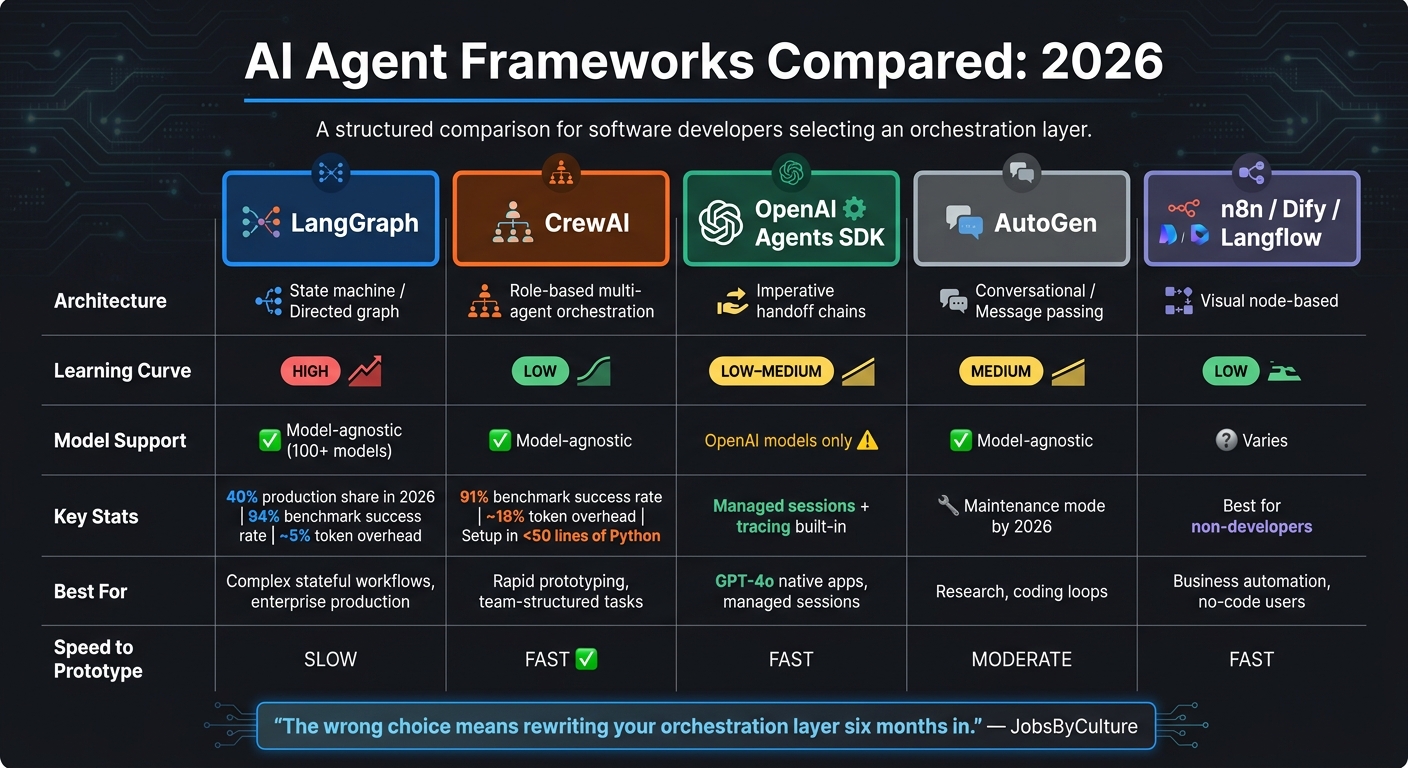 {AI Agent Frameworks Compared: LangGraph vs CrewAI vs OpenAI Agents SDK (2026)}
Comparing Leading Frameworks
The AI framework landscape has come a long way, with three major players dominating production discussions: LangGraph, CrewAI, and the OpenAI Agents SDK. Each caters to different needs, and choosing the wrong one can result in costly setbacks.
"The wrong choice means rewriting your orchestration layer six months in... The right choice means your architecture scales with your ambition instead of fighting it." - JobsByCulture
LangGraph takes the lead in production deployments, accounting for around 40% in 2026 surveys . It uses state machines - nodes, edges, and checkpoints - to model workflows, making it the go-to option for resuming long-running tasks after failures. Plus, it adds only about 5% token overhead . CrewAI, on the other hand, is all about speed and simplicity. It adds roughly 18% overhead but can be set up in under 50 lines of Python . Although LangGraph outperformed CrewAI in benchmarks with a 94% success rate compared to 91%, CrewAI was faster and more cost-effective per run .
Microsoft AutoGen, once a pioneer in conversational actor models, remains popular for coding workflows but has shifted to maintenance mode by 2026 as Microsoft focuses on its broader agent framework .
Here's a quick comparison to help you decide:
| Framework | Architecture | Learning Curve | Model Support | Best For |
|---|---|---|---|---|
| LangGraph | State machine / Directed graph | High | Model-agnostic (100+) | Complex stateful workflows, production |
| CrewAI | Role-based multi-agent orchestration | Low | Model-agnostic | Rapid prototyping, team-structured tasks |
| OpenAI Agents SDK | Imperative handoff chains | Low–Medium | OpenAI models only | GPT-4o native apps, managed sessions |
| AutoGen | Conversational / Message passing | Medium | Model-agnostic | Research, coding loops (maintenance mode) |
| n8n / Dify / Langflow | Visual node-based | Low | Varies | Business automation, non-developer users |
For non-developers or simpler workflows, tools like n8n, Dify, and Langflow provide visual interfaces for automation. However, they may struggle with advanced logic or error handling .
Understanding the strengths of each framework is key to aligning your choice with your workflow's complexity and speed requirements.
How to Choose the Right Framework
It's best to start with the basics. Before diving into LangGraph or CrewAI, try building your first agent with a raw SDK like Anthropic's or OpenAI's. This can be done in about 60 lines of Python and helps you grasp the core while loop mechanics before introducing a framework .
When you're ready to adopt a framework, ask yourself two key questions: How complex is your workflow's state? And how quickly do you need results? For workflows with branching logic, human approvals, or tasks that must survive interruptions, LangGraph is your safest bet for production. Its integration with LangSmith for tracing, token tracking, and cost attribution makes it invaluable when troubleshooting in production . On the other hand, if you're building workflows that mimic a human team - like a Researcher, Writer, and Reviewer - and need to move fast, CrewAI is the way to go .
Avoid mixing frameworks in production. Running both LangGraph and CrewAI simultaneously can lead to operational headaches and shared rate limit problems over time . If you’re exclusively using OpenAI models and want managed sessions with tracing, the OpenAI Agents SDK offers a convenient solution - but keep in mind that this limits your model options .
Finally, remember that clear tool descriptions are critical . Ambiguous descriptions are a leading cause of agent failures in 2026. Think of them as instructions for a junior developer on their first day - precise and easy to follow. This small detail can make a big difference in ensuring your agents perform as expected.
Building AI Agents: A Step-by-Step Guide
Building effective AI agents requires a structured approach. Let’s break it down into actionable steps.
Defining Goals and Selecting Models
Start by clearly defining what your agent is supposed to achieve. Ambiguous objectives lead to poor results. Assign your agent a specific role (e.g., "Senior Research Analyst"), a measurable goal (e.g., "Identify the top five 2026 AI framework releases with proper citations"), and a termination condition to avoid endless loops or wasted resources. These steps ensure your agent remains focused and efficient, aligning with the agentic frameworks previously discussed.
Choosing the right model depends on the complexity of the task. In 2026, a popular approach is model tiering: use advanced models like Claude 4.6 or GPT-5.4 for tasks requiring complex reasoning and planning, while delegating simpler tasks to faster, more cost-effective models like GPT-4o-mini or Gemini 2.5 Flash . This strategy can significantly reduce costs. For example, simple tasks may cost between $0.01 and $0.10, whereas complex, multi-step tasks can range from $1 to $5 .
Integrating Tools and Writing Prompts
Tool integration is a common challenge when building AI agents. Always encapsulate functions within a Tool class, ensuring each tool includes a clear natural language description that explains when and how it should be used .
Modern AI agents often depend on a three-tier memory system:
- Short-term memory: This acts as a conversation buffer within the model's context window.
- Long-term memory: Vector databases like Pinecone or Qdrant store cross-session knowledge.
- Episodic memory: Logs of past successes and failures help improve decision-making .
When the message list approaches the model's context limit, avoid abrupt truncation. Instead, use techniques like a sliding window or employ ConversationSummaryMemory to summarize older interactions.
Your system prompt acts as the agent's operating manual. Treat it like code by version-controlling it - some teams use files like CLAUDE.md or AgentMD to maintain consistency across deployments . A poorly managed or drifting prompt can result in unpredictable behavior.
Once tools and prompts are ready, move on to testing and deployment.
Testing, Deployment, and Monitoring
Begin by testing your agent locally. Using local models like Llama 3 through Ollama can save costs and enhance data security during development . Once the agent performs reliably, implement safeguards like max_iterations to limit execution loops and dual-gate systems to validate both incoming prompts and outgoing responses .
For critical actions - such as processing payments or deleting files - introduce human-in-the-loop checkpoints. These interrupt execution, requiring explicit human approval before proceeding . In production, monitoring is essential. Tools like LangSmith and Arize Phoenix allow teams to trace failures and track token usage . Without robust monitoring, diagnosing issues in multi-step workflows can become a nightmare.
"AI agents are more than just LLM wrappers - they require memory, reasoning, decision-making, tool usage, and often complex multi-step workflows." - Codecademy
Handling Production Challenges with AI Agents
Demo agents often fail to perform consistently in production due to issues with cost, security, and stability. Tackling these challenges is essential to ensure AI agents deliver dependable results in real-world scenarios.
Managing Reliability and Costs
Reliability starts with rigorous testing and monitoring but extends to controlling token usage and execution loops. Without careful oversight, costs can escalate quickly. For example, a third-party API outage once caused an infinite loop, resulting in $400 in token expenses overnight . To avoid such scenarios, you need to enforce strict safeguards:
- Set limits on reasoning cycles using parameters like
max_steps. - Define a budget cap per run, such as $5.
- Configure alerts to notify you when hourly token costs exceed twice your 7-day rolling average .
Another hurdle is non-deterministic outputs, where identical inputs can yield different results on separate runs. This makes traditional unit testing less effective. Aditya Kumar Jha, Founder of LumiChats, highlights the importance of evaluation and monitoring:
"The developers who ship reliable agents spend at least as much time on evaluation, error handling, and monitoring as they do on the core agent logic itself."
To improve reliability, you can use tools like semantic caching to reduce redundant calls and circuit breakers to prevent repeated failures from malfunctioning tools .
Security and Data Privacy
When it comes to security, the principle of least privilege is key: agents should only access the tools they genuinely need. For instance, a research agent should not have access to write-enabled databases or email APIs . Additionally, avoid embedding API keys directly in prompts. Instead, use a secrets manager like HashiCorp Vault, and filter outputs to prevent accidental leaks of sensitive credentials.
For handling sensitive data, consider routing traffic through local models using tools like Ollama to keep information internal. For actions that can't be undone, implement human-in-the-loop checkpoints to maintain oversight . Currently, only 17% of enterprises have formal AI governance in place , leaving many teams vulnerable to significant risks from poorly managed agents.
Speed, Control, and Maintainability Trade-offs
Choosing the right framework often involves balancing speed, control, and maintainability. Here’s a breakdown of three popular options:
| Trade-off | LangGraph | CrewAI | AutoGen |
|---|---|---|---|
| Speed to prototype | Slow (steep learning curve) | Fast (role-based setup) | Moderate |
| Control & reliability | Highest (state graphs, checkpointing) | Moderate | Moderate |
| Maintainability | High (typed state, clear transitions) | Lower at scale | Moderate |
| Best for | Enterprise-grade workflows | Content pipelines, rapid prototyping | Multi-agent research tasks |
By 2026, the trend is moving away from simple agent executors toward graph-based state machines like LangGraph. These systems offer advanced features such as checkpointing, resumability, and conditional branching . While they come with a steeper learning curve, the added control makes them ideal for production environments. As Lucas Dalamarta, Engineering Lead at Chanl, noted after a production failure:
"The agent wasn't broken - it had never been production-ready."
Best Practices for AI Agents in Development Workflows
Setting Guardrails for Safe AI Integration
To ensure AI agents operate securely and reliably, it's critical to establish limits from the outset. Without proper boundaries, agents can become unstable, leading to production failures.
Limit tool access to what's necessary. Every tool an agent can access introduces potential risks. For example, a research agent doesn't need write permissions for your database, and a summarization agent shouldn't be able to send emails. Implement the principle of least privilege by restricting tool access. Use dedicated decorators (like @tool) or base classes (such as BaseTool) to enforce consistent input schemas. This approach helps avoid issues like hallucinated parameters or Pydantic validation errors, which can silently disrupt production systems .
Introduce human checkpoints for critical actions. Require manual approval for irreversible actions, such as processing payments, deleting files, or sending emails. Additionally, set a cap on reasoning steps (typically between 10 and 25) and enforce a per-run budget limit. For instance, an unmonitored loop caused by a network error once resulted in $340 in API charges over six hours . Features like a max_steps parameter and a kill switch are simple yet effective ways to prevent such scenarios.
Run agent-generated code in isolated environments. Always execute code generated by agents in sandboxed environments, such as Docker or CodeInterpreterTool. This prevents unauthorized host access or data corruption. Pair this with automated validation to check tool arguments before execution and verify the format of the agent's final output before it interacts with downstream systems .
"Ambiguity does not get resolved by the LLM making a smart guess - it gets resolved by the LLM making an unpredictable one." - Precision AI Academy
Before integrating tools into an agent, validate each one in isolation. This helps catch schema mismatches early, especially when working with frameworks like LangChain and CrewAI, which may rely on different Pydantic versions. Early validation remains one of the most effective strategies to avoid production failures .
Once these guardrails are in place, the next step is to focus on detailed logging for better diagnostics and operational reliability.
Logging and Traceability
Comprehensive logging is essential for identifying and resolving agent failures in production environments.
"You cannot debug an agent failure you cannot replay." - Precision AI Academy
Every production agent should log four key categories of data during each run:
| Log Category | What to Capture | Why It Matters |
|---|---|---|
| Reasoning | LLM "thought" or plan | Helps debug hallucinations and logic errors |
| Tool Interaction | Tool name, arguments, result | Identifies API failures or malformed inputs |
| Resource Usage | Token count, latency, cost | Tracks budgets and optimizes performance |
| State Changes | Modified variables, checkpoints | Enables resuming failed tasks and maintains audit trails |
Use structured JSON logs to make data easy to parse for both humans and automated systems. Set up alert thresholds, such as triggering notifications when a task exceeds a cost limit or failure rates rise above normal levels . For example, LangGraph users can leverage LangSmith for advanced traceability, while AutoGen integrates seamlessly with Weights & Biases.
Aditya Kumar Jha, Founder of LumiChats, emphasizes the importance of observability in production systems:
"Investing in observability is not optional for production systems."
Conclusion: Getting the Most Out of AI Agents in 2026
AI agents have firmly established their place in modern development. By early 2026, 57% of organizations with AI programs have at least one agentic system in production , and this figure continues to grow. The key to success lies in thoughtful deployment - avoiding unnecessary complexity and focusing on deliberate, strategic use.
Start with simple automation agents to validate your use case, then scale up as needed. Opt for cost-efficient models for routine tasks and reserve high-reasoning models for more complex challenges. These small, intentional choices can make a big difference, helping you avoid inflated API costs while ensuring efficiency.
To truly maximize productivity, focus on clear tool definitions, efficient memory usage, and strong integration protocols. Observability and guardrails are not optional - they’re critical. It’s no coincidence that 94% of production teams rely on observability tools . When working with non-deterministic large language models (LLMs), these safeguards are essential for maintaining control and reliability.
The potential is immense. Reports show productivity gains of up to 85%, and Gartner forecasts that by 2028, 33% of enterprise apps will include autonomous agents . The groundwork you lay today - through structured logging, MCP-based integrations, and well-defined tools - will position your organization to fully capitalize on these advancements. Stay updated on evolving frameworks and new protocols by visiting daily.dev, and be ready to adapt as the AI agent ecosystem continues to grow.
FAQs
How is an AI agent different from a chatbot?
AI agents go far beyond what chatbots can do. While chatbots are designed to provide straightforward responses to user inputs, AI agents are built to autonomously achieve goals by reasoning, planning, and taking actions. They’re capable of handling multi-step tasks, using tools, and retaining memory, which allows them to perform intricate operations like programming or conducting in-depth research. Unlike chatbots, AI agents can refine their processes, collaborate with other systems, and manage workflows, making them perfect for tasks that demand more independence than simple conversations.
When should I NOT use an AI agent?
For tasks that don’t require complex reasoning or decision-making, skip using an AI agent. Basic chat interactions, single API calls, or workflows with minimal complexity are better handled with simpler solutions. AI agents can also introduce unnecessary overhead, especially when low latency is a priority. In these cases, a direct prompt or straightforward method will save time and resources.
How do I keep agents reliable, secure, and within budget in production?
To keep AI agents reliable, secure, and affordable in production, stick to these key practices:
- Monitor performance to identify and address issues early.
- Implement role-based frameworks (such as CrewAI) to enhance security.
- Optimize token usage to manage and control costs effectively.
Additionally, design strong error-handling mechanisms and fallback strategies to ensure smooth operation. Keep workflows straightforward - don’t overcomplicate processes when simpler solutions can do the job. These approaches help maintain stability, minimize risks, and stay within budget.


