
Run logic at the network edge to slash latency for auth, A/B testing, and personalization while balancing strict CPU, memory, and API limits.
Edge computing brings your application’s logic closer to users, reducing latency and improving performance. Instead of relying on a single, centralized data center, edge platforms like Cloudflare Workers, Deno Deploy, and Vercel Edge Functions distribute code across multiple global locations. This setup ensures faster response times, better user experiences, and lower Time to First Byte (TTFB).
Key advantages include:
- Near-zero cold starts: V8 isolates enable startup times under 1ms.
- Improved web performance: Cuts TTFB by 60–80% for global users.
- Global reach: Code runs within milliseconds of users worldwide.
- Familiar tools: Leverages Web APIs like Fetch, Web Crypto, and Streams.
However, edge platforms have limitations:
- Resource constraints: Memory is capped at 128MB, and CPU time is limited to 30–50ms.
- Stateless by design: Persistent caching and database connections require external solutions.
- Limited runtime: Only Web Standard APIs are supported, not Node.js-specific modules.
Quick Comparison
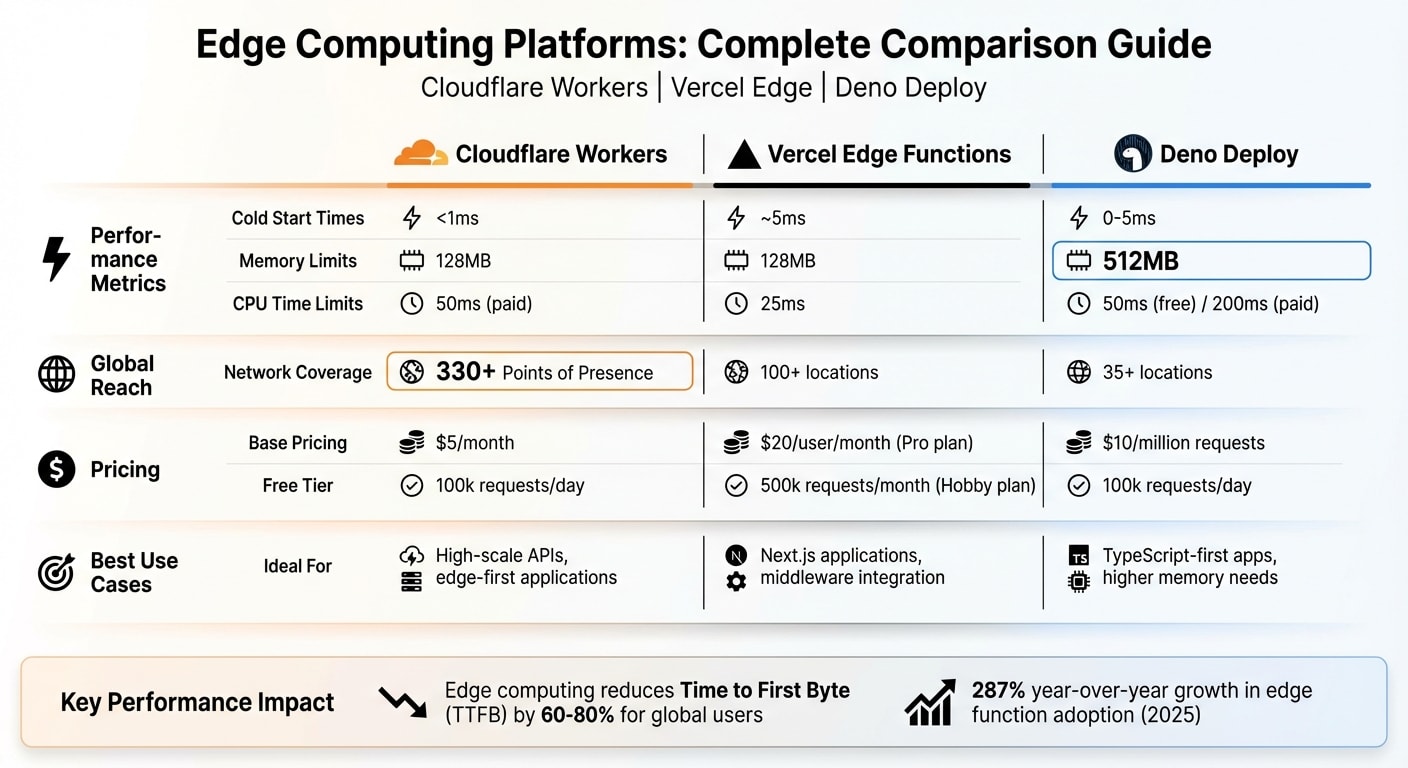
| Platform | Cold Start | Memory Limit | CPU Limit | Pricing (Base) | Free Tier | Best Use Case |
|---|---|---|---|---|---|---|
| Cloudflare Workers | <1ms | 128MB | 50ms | $5/month | 100k requests/day | High-scale APIs, edge-first apps |
| Vercel Edge | ~5ms | 128MB | 25ms | $20/user/month | 500k requests/month | Next.js apps, middleware |
| Deno Deploy | 0–5ms | 512MB | 50–200ms | $10/million reqs | 100k requests/day | TypeScript-first apps, higher memory |
If you are new to the ecosystem, check out these Deno basics for beginners to understand the runtime's core features.
Edge computing is ideal for tasks like authentication, A/B testing, and real-time personalization. For heavier workloads, such as image processing or long-running tasks, traditional serverless or centralized servers may be better. By combining edge and serverless solutions, you can build faster, more efficient applications tailored to user needs.
Edge Computing vs Serverless: Key Differences
Geography: Proximity to Users
Serverless functions, like AWS Lambda, generally operate from a single region - take us-east-1 in Virginia, for example. If a user in Tokyo makes a request, they can experience 200–300 milliseconds of network latency before the function even begins executing . In contrast, edge computing distributes code across 300+ Points of Presence (PoPs) in over 100 countries, cutting latency down to just 5–30 milliseconds .
This global distribution has a direct impact on performance. For instance, edge computing can reduce Time to First Byte (TTFB) by 60–80% for users worldwide. That’s significant when you consider that every 100 milliseconds of latency can cost a company like Amazon 1% in sales . But latency isn’t the only factor - startup speeds and runtime limits also play a major role in distinguishing these platforms.
Cold Starts and Runtime Limits
Startup speed and resource availability are other key differences between edge and serverless platforms. Serverless functions use containerized Node.js processes, which can take between 100 and 1,000 milliseconds to start (cold starts). On the other hand, edge platforms rely on V8 isolates, which can spin up in under 1 millisecond . These V8 isolates are also more memory-efficient, handling thousands of requests with far less overhead compared to containers .
However, edge computing comes with stricter runtime constraints. Edge functions are capped at 30–50 milliseconds of CPU time and 128MB of memory, whereas traditional serverless functions can run for minutes and use gigabytes of memory . Additionally, edge runtimes are limited to Web Standard APIs like Fetch, Web Crypto, and Streams. This means you won’t have access to Node.js-specific modules like fs, child_process, or net . If you’re considering migrating to edge, you’ll need to carefully review your dependencies to ensure compatibility.
| Property | V8 Isolate (Edge) | Container (Serverless) |
|---|---|---|
| Cold Start | < 1ms | 100–1,000ms |
| CPU Limit | 30–50ms | Minutes |
| Memory Limit | 128MB | 512MB–10GB |
| Node.js APIs | Web Standard APIs only | Full support |
| Global Deployment | 300+ PoPs | 1–4 regions |
| Cost Model | Per request | Per GB-second |
One notable limitation of edge functions is their stateless nature, which complicates persistent caching. Unlike traditional servers, edge functions don’t offer guaranteed memory persistence between invocations. A case in point: in August 2025, the API authentication service Unkey transitioned from Cloudflare Workers to stateful Go servers due to this limitation. Co-founder Andreas Thomas shared their experience:
"The fundamental issue was caching. In serverless, you have no guaranteed persistent memory between function invocations. Every cache read requires a network request to an external store, and that's where things got painful" .
Cloudflare Workers Tutorial
Key Features of Cloudflare Workers
Cloudflare Workers take advantage of edge computing, running your code in over 300 data centers worldwide. This setup ensures your applications respond within milliseconds to users, no matter their location . Built on V8 isolates, Workers deliver impressive performance, often achieving response times under 50 milliseconds.
The platform supports widely-used web APIs like fetch, Request, Response, Web Crypto, and Streams, giving developers the tools they need to create dynamic applications. The Wrangler CLI simplifies the entire process, from development to managing secrets and deploying globally. For even more control, Workers include features like HTMLRewriter for real-time HTML adjustments and Hyperdrive to optimize database connections in regional setups.
Cloudflare Workers offer a free tier, allowing up to 100,000 requests per day with 10 milliseconds of CPU time per invocation . For those with larger needs, the $5/month plan increases capacity to 10 million requests, extends CPU time to 30 seconds per invocation, and includes unlimited bandwidth. Beyond the plan limits, additional requests cost approximately $0.30–$0.50 per million .
Now let’s dive into how Workers integrate with storage solutions to enhance your applications.
Integrating D1, KV, and R2
Cloudflare Workers seamlessly connect to various storage options through bindings set up in your wrangler.toml file. These bindings are then accessible via the env object in your fetch handler . Here’s a quick breakdown of the available storage solutions:
- Workers KV: A globally distributed key-value store, perfect for configuration data and caching. It offers lightning-fast read latencies of 1–5 milliseconds.
- D1: A distributed SQLite solution, ideal for handling relational data.
- R2: S3-compatible object storage with the added benefit of zero egress fees .
For scenarios demanding strong consistency or real-time coordination (like chat apps or live updates), Durable Objects provide stateful execution with a single-instance model.
When working with request bodies, keep in mind that they can only be read once. If you need to reuse the body, make a copy using request.clone() . To handle background tasks, such as logging or telemetry, use ctx.waitUntil() to ensure these processes don’t delay your response. Additionally, the Cache API (caches.default) allows you to store computationally expensive results directly at the edge, which helps conserve CPU resources .
Vercel Edge Functions and Middleware
Getting Started with Vercel Edge Functions
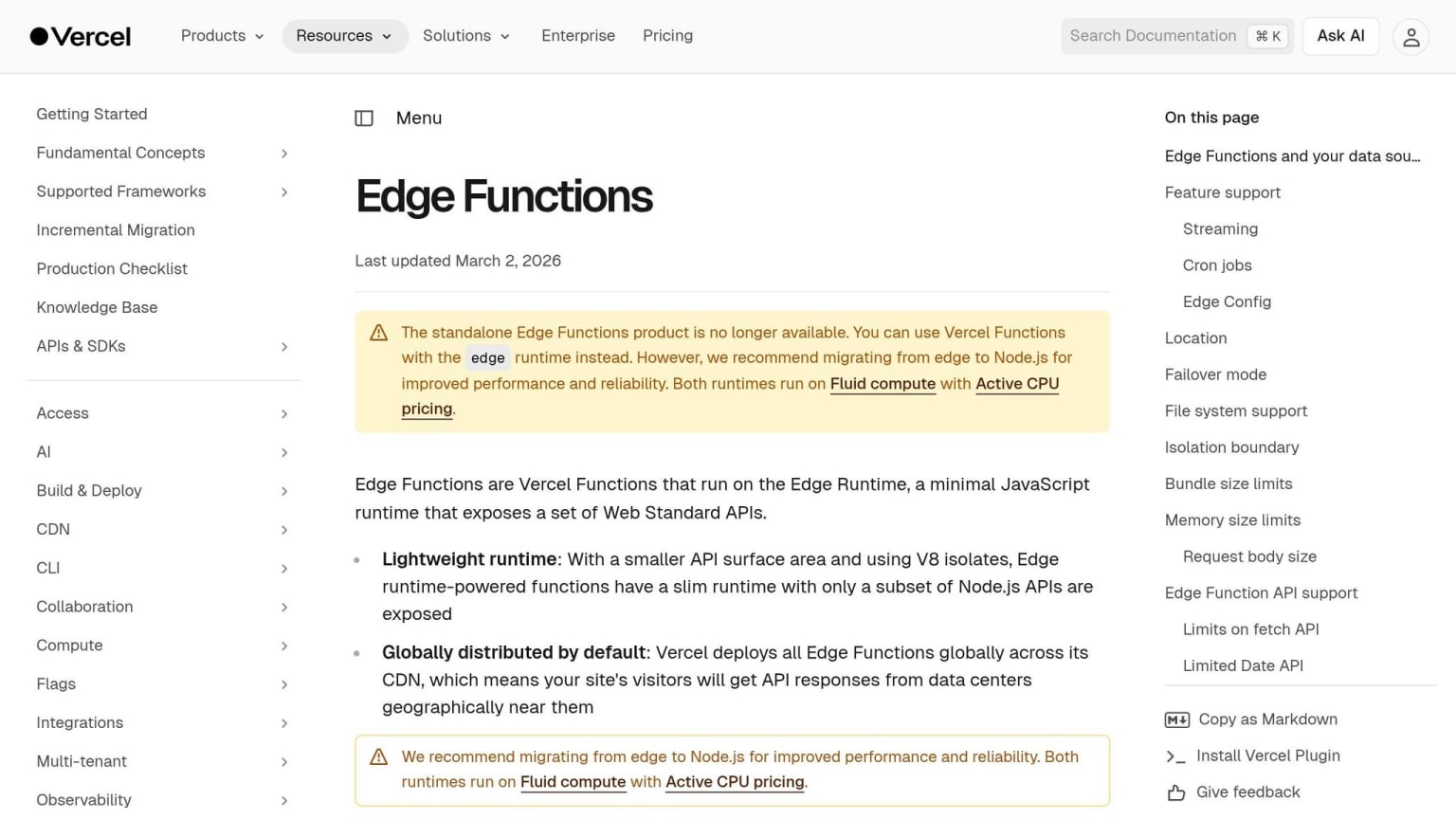
Vercel Edge Functions operate on a lightweight V8 engine and are deployed across more than 100 global locations. This ensures execution happens close to users, relying solely on Web-standard APIs like fetch, Request, Response, and Web Crypto . However, they don't support native Node.js modules such as fs or child_process .
In December 2022, Vercel transitioned its OG Image Generation project from traditional serverless architecture to WebAssembly running on Edge Functions. The results were impressive: a 5× faster P99 Time to First Byte (TTFB), around 15× cost savings per million images generated, and a 40% speed improvement compared to a hot serverless function .
To enable Edge Functions in Next.js, simply add the following to your route configuration:
export const runtime = 'edge';
The pricing is straightforward. The Hobby plan offers 500,000 execution units per month at no cost. The Pro plan, priced at $20/month, includes 1 million invocations, with additional usage billed at $0.60 per million . Billing is based on 50ms CPU time units, meaning you're not charged for idle time waiting on external API calls .
"We shifted Keystone's API Routes incrementally from Serverless to Edge Functions and couldn't be happier... we've been able to reduce costs and we've seen our compute efficiency drastically improve."
– Tormod Ulsberg, Principal Architect, Keystone Education Group
To ensure optimal performance, keep your code bundle lightweight. Vercel enforces a compressed code size limit of 1 MB for Hobby accounts and up to 4 MB for Enterprise accounts . Edge Functions also boast near-zero cold starts (under 50ms) and require a response to begin within 25 seconds, though streaming can continue for up to 300 seconds . These features make them ideal for frontend developers seeking faster, more efficient execution. Building on this speed, Vercel Middleware introduces advanced request handling and personalization at the edge.
Middleware with Next.js
Vercel Middleware takes edge execution to the next level by enabling real-time request interception and response customization. Operating on the Edge Network before the cache, it allows developers to handle tasks like redirects, rewrites, and header injections . To get started, create a middleware.ts file in your project's root directory .
During its public beta, Vercel Edge Middleware routed over 30 billion requests, with participation from more than 100,000 developers. Nearly half of Vercel's Enterprise customers adopted it, and the median response time clocks in at just 40ms .
One practical example comes from SumUp, which uses Middleware for server-side A/B testing. By rewriting URLs at the edge with NextResponse.rewrite(), they can deliver experimental versions of pages instantly, avoiding layout shifts and flickering often caused by third-party scripts . Similarly, HashiCorp uses Middleware's geo object to tailor content based on a visitor's location, ensuring compliance with regional regulations .
"With Edge Middleware, we can show the control or experiment version of a page immediately instead of using third-party scripts. This results in better performance and removes the likelihood of flickering/layout shifts."
– Jillian Anderson Slate, Software Engineer, SumUp
For authentication tasks, the jose library is recommended for JWT verification, as it avoids unsupported Node.js modules like those used by jsonwebtoken . To enhance performance, you can define a matcher in your configuration to limit Middleware execution to specific routes while excluding static assets . The Hobby plan includes 1 million Middleware invocations per month for free . These features help reduce latency and improve user experience, making Middleware a powerful tool for edge computing in frontend development.
Deno Deploy Guide: Web-Standard APIs at the Edge
Overview of Deno Deploy
Deno Deploy is a platform that lets you run TypeScript and JavaScript natively, eliminating the need for separate build or transpilation steps. This means you can write and deploy your code immediately, skipping time-consuming build pipelines. With 35+ global locations, Deno Deploy offers impressive performance metrics, including a ~3ms cold start, 10ms P50, and 38ms P99 latencies.
One standout feature is its 512MB memory allocation, which far exceeds the 128MB cap of some competitors. This makes it suitable for more complex backend operations, such as running full application backends with frameworks like Fresh or Hono, rather than just lightweight middleware. Additionally, its Rust-based architecture ensures low overhead while adhering strictly to Web standards.
For storage, Deno Deploy includes Deno KV, a globally distributed key-value database. Unlike eventually consistent options like Cloudflare KV, Deno KV offers strong consistency within regions, making it a reliable choice for edge applications. The free tier supports 100,000 requests per day with 50ms of CPU time per invocation, while the Pro plan costs $10 per million requests and provides 200ms of CPU time. Note that Deno Deploy Classic (dash.deno.com) will be discontinued on July 20, 2026, so new projects should use the updated platform at console.deno.com.
With these features, Deno Deploy is well-suited for building complex edge applications that require high performance and flexibility.
Using Deno Deploy for Edge Applications
Deno Deploy provides a streamlined option for edge applications, especially when compared to platforms like Cloudflare Workers or Vercel Edge Functions. Its native support for TypeScript and JavaScript, combined with increased memory limits, makes it a strong choice for developers. To get started, install the deployctl utility for local testing and command-line deployments:
deno install -A jsr:@deno/deployctl --global
One of Deno Deploy's strengths is its reliance on standard Web APIs, which ensures high portability of your code. Developers familiar with browser APIs can use their skills without needing to learn platform-specific abstractions.
With the release of Deno 2.0, the platform now supports full Node.js and npm compatibility, significantly expanding the available library ecosystem. For stateful data, Deno KV is a great option for low-latency operations, while the Cache API can handle results from computationally intensive tasks. Security is another focus: Deno Deploy operates on an explicit permissions model, meaning your code cannot access the network or environment variables unless explicitly granted access. For scheduled tasks, the platform includes the native Deno.cron API, offering robust support for recurring jobs.
Comparison Table: Cloudflare Workers, Vercel Edge, and Deno Deploy
Here’s a quick breakdown of how the top edge platforms - Cloudflare Workers, Vercel Edge Functions, and Deno Deploy - stack up against each other.
Cloudflare Workers stands out by charging only for CPU time, meaning you’re billed for active processing rather than idle time. This pricing model makes it highly efficient at scale. With a free tier offering 100,000 daily requests and paid plans starting at $5/month for 10 million requests, it’s a budget-friendly option for high-scale APIs and edge-first apps.
Vercel Edge Functions are included in Vercel’s tiered plans, with the Pro plan costing $20 per user/month and covering 1 million invocations. Its tight integration with Next.js simplifies workflows for React developers. This shift reflects a broader server-side rendering renaissance where logic moves back to the server for better performance. However, costs can vary with increased bandwidth usage, making it a bit harder to predict expenses during traffic spikes.
Deno Deploy takes a balanced approach with request-based pricing at $10 per million requests. It offers a generous 512MB memory limit, far surpassing the 128MB provided by the other two platforms. With native TypeScript support and npm compatibility (introduced in Deno 2.0), it’s an appealing choice for developers focused on modern web standards.
| Feature | Cloudflare Workers | Vercel Edge Functions | Deno Deploy |
|---|---|---|---|
| Base Price | $5/month | $20/user/month (Pro) | $10/million requests |
| Free Tier | 100k requests/day | Included in Hobby plan | 50ms CPU time limit |
| Cold Start | <1ms | ~5ms | 0–5ms |
| Memory Limit | 128MB | 128MB | 512MB (Pro) |
| CPU Limit | 50ms (Paid) | 25ms | 50ms (Free) / 200ms (Paid) |
| Global Locations | 330+ PoPs | 100+ locations | 35+ locations |
| Best For | High-scale APIs and edge-first apps | Next.js applications and middleware | TypeScript-first apps and higher memory needs |
"Cloudflare charges only for compute, not wall time, even during long agent workflows or hibernating WebSockets." - Cloudflare Workers
All three platforms rely on V8 isolates, ensuring near-zero cold starts (typically under 5ms). However, they differ in memory limits, execution times, and network reach. Cloudflare leads with an extensive global network capable of handling over 81 million HTTP requests per second. It also offers a range of edge-native tools like D1, KV, R2, and Durable Objects. Vercel shines in its seamless integration with Next.js, making it the go-to for React-based projects. Meanwhile, Deno Deploy’s focus on TypeScript and npm compatibility positions it as a strong choice for developers prioritizing modern development standards.
Common Patterns Enabled by Edge Computing
Edge computing opens up a world of possibilities by taking advantage of its speed and proximity to users. One of its standout capabilities is the ability to intercept requests and modify responses in real time.
A/B Testing and Personalization
A/B testing at the edge eliminates the "flickering" often seen with client-side testing tools. Instead of swapping content on the client side, edge functions decide the variant before the HTML even reaches the browser. A great example comes from April 2025, when Sortlist used Cloudflare Workers and Next.js to run A/B tests for millions of visitors. Nicolaos Moscholios, a Staff Frontend Engineer, led the effort to test a new provider profile layout. By assigning experiments at the edge and leveraging custom cache keys, Sortlist found that the "variation-1" layout - with a larger "Contact" button - produced a 3% boost in the "contact initiated" conversion rate compared to the control group.
The secret behind edge-based A/B testing is deterministic assignment. By hashing a user's ID or session cookie, you ensure the same variant is consistently delivered across sessions without repeatedly querying the database. For quick lookups, experiment definitions can be stored in globally replicated systems like Vercel Edge Config or Cloudflare KV, achieving sub-millisecond response times. For less critical experiments, such as those "below the fold", you can rely on client-side evaluation to maintain high cache hit rates.
This deterministic approach also underpins dynamic personalization. Cookies, headers, or geolocation data processed at the edge enable instant, tailored content delivery, particularly for "above the fold" content where performance and SEO are key priorities.
Authentication and Geolocation
Edge computing isn't just about testing and personalization - it also reshapes authentication and regional content delivery. Edge functions are highly effective at validating tokens and session cookies, thanks to the Web Crypto API, which is supported across platforms like Cloudflare, Vercel, and Deno. This allows unauthorized requests to be blocked at the edge, redirecting users to login pages without involving your central server.
Geolocation routing is another standout feature. Many edge platforms provide geographic headers (e.g., country, city, region) through tools like request.cf on Cloudflare or request.geo on Vercel. This data can be used to serve localized pricing, language-specific content, or even block access from restricted regions - all without needing to query your origin server. The benefits are striking: edge computing can reduce Time to First Byte (TTFB) by 60-80% for global users. And as Amazon famously discovered, every 100ms of latency can result in a 1% drop in sales.
To maximize efficiency, keep your edge logic lightweight. For example, Cloudflare Workers have a 50ms CPU limit, while Vercel Edge Functions allow just 25ms. Use matchers to ensure middleware only runs on protected routes, avoiding unnecessary processing for static assets. With these strategies, you can make the most of the strict CPU and memory limits while optimizing edge performance.
Edge Databases: Turso, Neon, and PlanetScale
Traditional databases often rely on TCP, connection pooling, and come with high regional latency - making them less suited for distributed edge functions. Edge-compatible databases tackle these challenges by using HTTP or WebSockets, enabling smooth integration with platforms like Cloudflare Workers, Vercel Edge, and Deno Deploy.
Let’s take a closer look at three standout edge databases: Turso, Neon, and PlanetScale. Each offers a distinct architecture designed to handle queries from edge functions without connection limits or excessive latency.
Turso: Distributed SQLite at the Edge
Turso is built on libSQL, an open-source fork of SQLite, and brings added features like native vector search and WebAssembly user-defined functions. Its standout capability lies in embedded replicas - these replicas run directly within your application at edge locations. This eliminates network hops, delivering sub-millisecond read latency.
Here’s how it works: writes are routed to a primary instance, which replicates data to global edge locations. For multi-tenant SaaS applications, Turso supports up to 10,000 isolated databases on its free tier, making it ideal for "database-per-user" setups. Pricing starts at $4.99 per month for the Developer plan, which includes 5 GB of storage and 500 million row reads.
"The most powerful feature of Turso is embedded replicas. Instead of connecting to a remote database over the network, you can embed a local SQLite replica directly in your application." – DevTools Guide Editorial Team
Important Note: SQLite doesn’t support a native boolean type, so use 1 and 0 as substitutes. Additionally, for Cloudflare Workers, opt for the @libsql/client/web driver, as the standard driver isn’t compatible with that environment.
Neon and PlanetScale for Serverless Databases
Neon separates compute from storage, offering features like copy-on-write branching that allow instant database cloning - perfect for testing schema changes or creating preview environments. Cold starts from idle states typically range between 400–750 milliseconds, but you can address this by setting a minimum compute size. For edge compatibility, Neon provides the @neondatabase/serverless driver supporting both HTTP and WebSocket connections.
PlanetScale, built on Vitess, specializes in horizontal sharding, making it a strong choice for write-heavy workloads. It also supports managed Postgres and includes a "deploy request" workflow for zero-downtime schema migrations.
| Database | Engine | Starting Price | Best For | Edge Latency |
|---|---|---|---|---|
| Turso | SQLite (libSQL) | $4.99/mo | Global edge reads, multi-tenancy | <1ms (embedded replicas) |
| Neon | PostgreSQL | ~$5/mo | CI/CD branching, AI agents | ~5–8ms (hot queries) |
| PlanetScale | MySQL / Postgres | $5/mo | Enterprise sharding, schema reviews | ~5–8ms (hot queries) |
A popular approach combines Neon as the primary write store for consistency with Turso as a distributed edge-read layer for better global performance. This hybrid setup highlights how blending traditional and edge-native databases can balance write reliability with read speed. These tools are essential for developers aiming to maintain performance and scalability when building on platforms like Cloudflare Workers, Vercel Edge, and Deno Deploy.
When Not to Use Edge Computing
Edge computing has its strengths, but it’s not the right fit for every scenario. While it shines in handling quick, lightweight tasks, certain workloads are better suited for traditional serverless functions or centralized servers.
Limitations of Edge Runtime
Edge platforms are designed for speed, but that focus comes with trade-offs, particularly in execution time. For instance, Cloudflare Workers and Vercel Edge Functions are capped at 30 seconds per execution . Deno Deploy is even more restrictive, with CPU time limits of 50ms on the free tier and 200ms on paid plans . These restrictions make edge computing unsuitable for tasks like background jobs, batch processing, or long-running computations. In contrast, traditional serverless options like AWS Lambda can handle workloads for up to 15 minutes .
Memory constraints also pose challenges. Most edge platforms limit memory to just 128MB . This makes it difficult to handle tasks like processing large files, running machine learning models, or performing memory-heavy operations. For example, parsing multi-megabyte JSON payloads or processing high-resolution images requires more computational power than edge environments can provide.
The runtime environment is another factor to consider. Edge platforms use a streamlined, sandboxed environment designed for speed and security. This means many Node.js-specific libraries won’t work. As Priya Sharma, a Full-Stack Developer at ZeonEdge, explains:
"The edge runtime is sandboxed for security and performance... You can't use fs, child_process, net, or any module that accesses the OS directly" .
Instead, developers are limited to Web Standard APIs like fetch, Request, and Response. This requires auditing and potentially reworking dependencies before migrating to edge.
Code bundle size is another limitation. For example, Cloudflare Workers restrict deployments to a maximum of 1MB . This can be a problem for projects involving large frameworks, machine learning inference, complex cryptography, or intensive data transformations. These tasks may exceed CPU limits, resulting in 503 errors .
Database connectivity also presents hurdles. Edge functions don’t support direct TCP connections, making traditional database drivers for PostgreSQL, MySQL, or MongoDB incompatible. Instead, developers must rely on HTTP-based solutions or edge-native data stores. If your application depends on a centralized database in a single region, the latency benefits of edge computing are negated by the required round-trip to the database .
| Scenario | Use Edge? | Better Alternative |
|---|---|---|
| API authentication, A/B testing, geolocation routing | ✓ Yes | - |
| Image processing, video transcoding | ✗ No | AWS Lambda, dedicated servers |
| WebSocket connections, connection pooling | ✗ No | Containers (ECS, K8s) |
| Background jobs (S3 uploads, email queues) | ✗ No | AWS Lambda, GCP Functions |
| Heavy ML inference, complex regex | ✗ No | Traditional serverless |
As Tithi Shah points out:
"But if you need heavy computation, large dependencies, or Node.js-specific features, stick to traditional serverless functions or backend servers" .
A growing trend in architecture as of 2026 is the hybrid approach. This model uses edge computing for tasks at the CDN layer (e.g., authentication, redirects), containers for application logic (CRUD operations and business logic), and serverless for background tasks . These limitations highlight why many developers are blending edge computing with other solutions. The next section will explore how to migrate from serverless to edge effectively.
Migration Guide: From Serverless to Edge
Shifting from traditional serverless setups to edge computing isn’t as simple as copying and pasting your code. The architectural differences - like AWS Lambda’s full Node.js environment versus the stripped-down V8 isolates used by edge platforms - demand a more deliberate approach.
Planning Your Migration
The first step is a dependency audit. Use edge simulators like Miniflare or Vercel Edge Runtime to test your code. These tools help identify errors caused by unsupported Node.js APIs, such as fs or child_process. When you find unsupported APIs, replace them with Web Standard alternatives.
Next, evaluate resource constraints. Edge platforms typically limit memory to 128MB and CPU time to 30–50ms. If your functions handle large JSON payloads, perform complex computations, or process data intensively, they might exceed these limits. Use profiling tools to separate CPU time from wall-clock time to ensure your code stays within acceptable bounds.
Database connectivity presents another challenge. Edge functions can’t establish direct TCP connections, which means traditional drivers for databases like PostgreSQL, MySQL, or MongoDB won’t work. Instead, you’ll need to adopt HTTP-based drivers or switch to edge-native databases. Keep in mind that if your app relies on a centralized database in a single region, the latency benefits of edge computing could be reduced due to the added database latency.
You’ll also need to think about data consistency. Many edge KV stores (e.g., Cloudflare KV) offer eventual consistency, with propagation delays of up to 60 seconds . This makes them unsuitable for operations requiring strong consistency, like inventory management or session state maintenance.
Once you’ve audited dependencies and assessed resource constraints, you can move forward with a phased migration plan.
Implementing Edge Solutions
To reduce risk, adopt a phased migration strategy:
- Start with low-priority tasks, such as redirects, adding security headers (CSP, HSTS), or bot detection.
- Migrate tasks like JWT validation to the edge using the Web Crypto API. This blocks unauthorized requests early in the process.
- Implement edge caching with
stale-while-revalidateheaders. This can reduce Time to First Byte (TTFB) by 60–80% for users worldwide . - Move configuration settings or feature flags to globally replicated stores like Vercel Edge Config or Cloudflare KV for lightning-fast reads.
Keep an eye on your bundle sizes. For instance, Cloudflare Workers limit deployments to 1MB compressed . Frameworks like Hono are built to work smoothly across major edge runtimes. As yusukebe, the creator of Hono, explains:
"Node.js libraries that rely on
fsorevalcan no longer be used. However... the developer experience for developing simple Web applications based on Request/Response is excellent" .
After implementing these changes, test your setup in a production-like environment. Look for potential issues, such as exceeding CPU or memory limits. While edge functions often start in under 1ms thanks to V8 isolates , traditional serverless functions can experience cold starts ranging from 100–1,000ms . If you encounter problems like 503 errors (which might indicate CPU limits are being hit), consider a hybrid approach. For example, you could handle authentication and routing at the edge while offloading heavier processing to traditional serverless platforms.
Conclusion
Edge computing is changing the game for frontend developers, fundamentally shifting how applications are built and deployed. By running code within 50ms of users worldwide, platforms like Cloudflare Workers, Vercel Edge Functions, and Deno Deploy deliver impressive improvements, including a 60–80% reduction in Time to First Byte . This directly enhances user experience and even impacts conversion rates.
The numbers speak for themselves: in 2025, edge function adoption skyrocketed by 287% year-over-year, with 56% of new applications utilizing at least one edge function . What was once experimental is now mainstream. Thanks to V8 isolates, cold start times have dropped dramatically - from 100–1,000ms to under 1ms . For tasks like authentication, A/B testing, and personalization - where low latency is critical - the edge has become the go-to solution.
That said, edge computing isn’t a one-size-fits-all answer. Its limitations, such as 128MB memory caps, 30–50ms CPU constraints, and reliance on Web Standard APIs, require developers to rethink certain architectural choices . Tasks involving heavy computation, large file processing, or direct database connections are still better suited for traditional serverless or backend environments. The challenge is figuring out where the edge fits into your tech stack.
"Edge computing is a foundational architectural shift, not a quick optimization." - Digital Applied
A good starting point? Migrate lightweight tasks like redirects, security headers, or JWT validations to the edge. Audit your Node.js-specific dependencies and keep an eye on CPU usage to avoid surprises. As you experiment, you'll uncover scenarios where edge computing delivers real performance gains - and where it doesn’t.
The tools are ready, the platforms are reliable, and the benefits are measurable. By carefully choosing the right use cases, you can make edge computing a powerful part of your architecture.
FAQs
What should I run at the edge vs on serverless?
Run tasks at the edge that demand low latency and close geographic proximity. These include activities like personalization, geolocation, A/B testing, authentication, and API routing. Such tasks are lightweight and operate well within the constraints of edge runtimes.
For longer processes, resource-intensive computations, or tasks that rely on Node.js APIs - like machine learning or complex data handling - it's better to use serverless functions or backend servers. These scenarios often need more resources and longer execution times.
How do I handle state and caching on the edge?
To efficiently handle state and caching at the edge, consider using strategies like stale-while-revalidate. This approach allows you to serve cached responses immediately while updating the data in the background, ensuring a balance between speed and freshness. Tools like Cloudflare KV or PlanetScale are excellent for low-latency data reads, making them ideal for tasks such as managing user segments or feature flags.
For the best performance, delegate lightweight tasks - like authentication or geolocation - to the edge. Meanwhile, leave heavier computations and complex logic to the origin servers, where more resources are available to handle them effectively.
How can I use a database from edge functions safely?
To safely interact with a database from edge functions, choose edge-native databases such as Cloudflare's D1, KV, or R2. These databases are built to minimize latency by keeping data close to the compute layer. They're perfect for lightweight tasks like managing configuration settings or feature flags. However, avoid using edge functions for long-running operations or heavy processing. Instead, handle those tasks on origin servers to ensure better resource management and reliability.