.png)






Compare Turborepo, Nx, and Bazel to pick the right monorepo tool based on team size, languages, and CI performance.
Monorepos are now mainstream in 2026, used by 63% of companies with 50+ developers. They simplify code sharing, dependency management, and cross-project updates, but only when paired with the right tools. The big question is: Turborepo, Nx, or Bazel - what's best for your team?
- Turborepo: Great for small to medium JavaScript/TypeScript projects (5–50 packages). Quick build setup, caching, and integration with Vercel make it easy to use.
- Nx: A more advanced platform for teams managing larger monorepos or requiring features like code generation, architectural rules, and multi-language support.
- Bazel: Built for massive, multi-language repositories and large teams (1,000+ engineers). Offers unparalleled precision and scalability but requires significant setup and expertise.
Quick Comparison
| Feature | Turborepo | Nx | Bazel |
|---|---|---|---|
| Best For | Small JS/TS projects | Medium to large teams | Massive, multi-lang |
| Ease of Use | Simple setup | Moderate complexity | High complexity |
| Languages | JS/TS | JS/TS + plugins | Polyglot |
| Caching | Task-based | Advanced (Named Inputs) | Action-based |
| CI Distribution | Manual setup | Automatic (Nx Agents) | Remote execution |
Monorepos excel for shared dependencies and coordinated updates but may not suit autonomous teams or heterogeneous tech stacks. Choose a tool based on your team size, project complexity, and language needs.
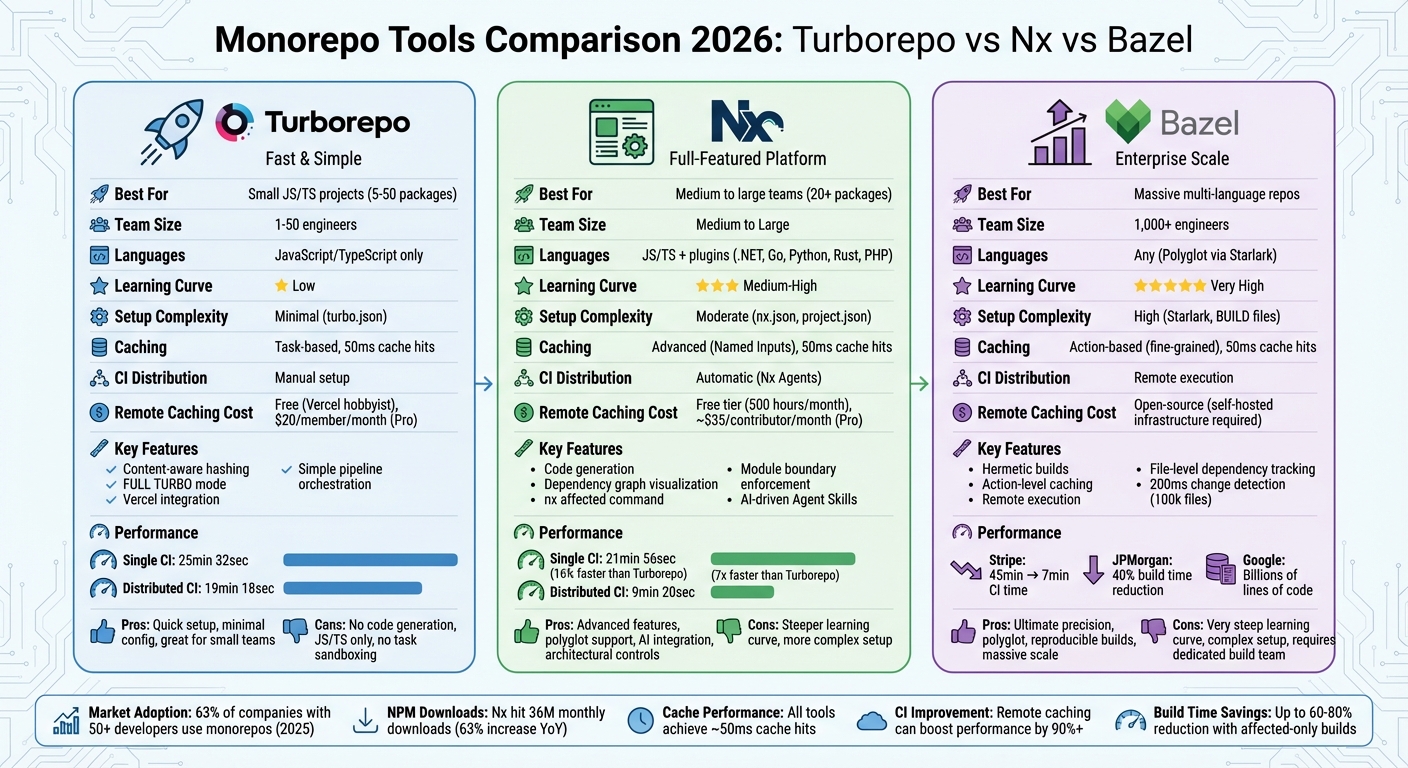
Turborepo vs Nx vs Bazel: Monorepo Tool Comparison 2026
Nx vs Turborepo vs Bazel vs Lerna 🔥 Choosing the Right Monorepo Tool #04

sbb-itb-bfaad5b
Monorepo vs Polyrepo: Making the Decision
Deciding between a monorepo and a polyrepo depends on your team's structure and workflow preferences. Key factors include how tightly projects are connected, how often cross-project changes occur, and whether your team values shared conventions or prioritizes autonomy.
Main Differences Between Monorepos and Polyrepos
Monorepos and polyrepos differ in how they handle code sharing, dependency management, and team workflows. For example, monorepos use direct imports via workspace protocols like workspace:*, allowing shared library changes to take effect immediately. In contrast, polyrepos depend on published packages and semantic versioning, which can introduce delays in updates.
Dependency management also varies. Monorepos rely on a single lockfile, ensuring consistent dependencies across projects and minimizing version mismatch issues. Polyrepos, on the other hand, manage dependencies separately for each project, which offers flexibility but risks inconsistencies.
When it comes to making changes, monorepos shine with atomic updates. A single pull request can handle updates across multiple projects, such as modifying a shared API, updating TypeScript types, and tweaking the frontend - all in one go. Polyrepos require coordinated pull requests across multiple repositories, which can slow down cross-team efforts. However, polyrepos have an edge in access control, as they naturally support per-repo permissions, making it easier to restrict access for contractors or specific teams.
| Factor | Monorepo | Polyrepo |
|---|---|---|
| Code Sharing | Direct imports; instant updates | Via registry; versioned updates |
| Versioning | Unified (single lockfile) | Independent per project |
| Changes | Atomic (cross-project in one PR) | Coordinated across multiple repos |
| Team Autonomy | Shared conventions required | Full independence |
| Access Control | Harder to restrict | Native per-repo permissions |
| Git Performance | Can degrade at massive scale | Consistently fast |
These differences can help guide your decision, depending on your team's needs and priorities.
When to Use a Monorepo
Monorepos are ideal when projects share code and require synchronized updates. For instance, if your frontend and backend share TypeScript types or several apps depend on the same component library, a monorepo can simplify versioning and reduce headaches. Teams of 5–50 engineers often find monorepos particularly useful - large enough to benefit from streamlined code sharing but still small enough to avoid major Git performance issues.
The ZTABS Team sums it up well:
Monorepos excel when packages share dependencies and release together; Polyrepos are better when teams are autonomous and deploy independently.
If your team frequently refactors shared code, needs coordinated releases, or wants consistent tooling for linting, testing, and builds, a monorepo is likely the better choice. It's worth noting that in 2025, 63% of companies with 50 or more developers used monorepos for precisely these reasons.
When Polyrepos Make More Sense
Polyrepos work best for teams that operate independently and communicate through stable APIs. For example, if your backend, data pipeline, and infrastructure teams rarely interact with each other's code, separate repositories allow each team full control over their tools and release schedules.
Another advantage is Git performance, which remains steady regardless of the number of projects your organization manages.
Turborepo: Fast Builds with Simple Setup
Turborepo is designed for teams working with JavaScript and TypeScript, providing fast task execution with minimal configuration. Its standout feature is a content-aware hashing system that generates a unique hash for each task based on factors like source files, dependencies, environment variables, and tool versions. If the hash hasn’t changed, Turborepo skips re-executing the task and retrieves the output from cache - often in as little as 50ms. When all tasks are served from the cache, the system displays "FULL TURBO", signaling an almost instant build process.
Setting up Turborepo is straightforward. A single turbo.json file at the project root defines task dependencies. Independent tasks are automatically parallelized across available CPU cores. Turborepo integrates smoothly with npm, pnpm, yarn, and Bun workspaces.
For even greater efficiency, remote caching via Vercel allows teams to share cached outputs. When one developer or CI runner builds a package, others can pull the results instead of rebuilding, cutting CI times by over 90%. Vercel users benefit from automatic remote caching, while external CI systems like GitHub Actions need only the TURBO_TOKEN and TURBO_TEAM environment variables to enable this feature.
An example of Turborepo's impact comes from Mercari Engineering's Web Platform Team, which implemented a self-hosted Turborepo remote cache in February 2026. Using custom GitHub Actions, they reduced Turbo task durations by 50% and overall job durations by 30% for pull request builds in a large, modularized repository. This kind of tooling can shrink CI times from 30 minutes to just 2 minutes.
What Turborepo Offers
Turborepo focuses on speed and simplicity. Its pipeline orchestration uses topological ordering to ensure packages build in the right sequence while maximizing parallel execution. For instance, if your web app relies on a shared UI library, Turborepo builds the library first, then runs the app build alongside other independent tasks.
You can refine builds with filter syntax, such as turbo build --filter=@myorg/web or --filter=...[HEAD~1], to target specific packages or recent commits. For persistent tasks like development servers, caching can be disabled by setting "cache": false and "persistent": true in the configuration. Security is also a priority, with HMAC-SHA256 signatures verifying the integrity of artifacts downloaded from remote caches.
However, Turborepo does have limitations. Unlike Nx, it doesn’t offer task sandboxing, which means tasks can access files beyond their declared inputs and outputs. This requires careful configuration to avoid incorrect cache usage.
Best Projects for Turborepo
Turborepo is a great fit for small to medium-sized JavaScript and TypeScript monorepos with fewer than 50 packages. Teams of 5–50 engineers will appreciate its shared caching and efficient builds without the complexity of tools like Bazel. For teams looking to get started quickly, Turborepo is an excellent option.
Turborepo is the most approachable monorepo tool. It does one thing well: fast task execution with caching.
- DevTools Guide Editorial Team
The tool is particularly effective for teams that deploy through Vercel, as remote caching integrates seamlessly, offering notable time savings. It’s also well-suited for projects that share TypeScript types, component libraries, or other code requiring synchronized updates. Using pnpm workspaces with Turborepo is often recommended for stricter dependency management.
That said, Turborepo isn’t ideal for advanced use cases like complex code generation, distributing tasks across multiple CI machines, or supporting languages beyond JavaScript and TypeScript. In a 2026 benchmark, Turborepo completed a single-machine CI build in 25 minutes and 32 seconds - 16% slower than Nx’s 21 minutes and 56 seconds. On distributed CI setups with four machines, the performance gap widened further due to Turborepo’s lack of dynamic task distribution.
Nx: Full-Featured Developer Platform
Building on the earlier discussion about monorepo benefits and the evolution of tools, Nx stands out as a robust solution for managing today’s complex workflows. Unlike Turborepo, Nx offers more than task orchestration - it’s a complete development platform. With features like code generation, dependency graph visualization, and seamless framework integrations, Nx is designed to handle intricate projects. Its intelligent task orchestration uses a dependency graph to ensure tasks are executed in the right order. A standout feature is the nx affected command, which rebuilds or tests only the projects impacted by a change, saving both time and resources.
Nx takes caching to the next level with "namedInputs", which define reusable input patterns. This allows for selective cache invalidation, such as ignoring changes in test files when they don’t affect the build. Performance benchmarks highlight Nx’s efficiency: single-machine CI builds took 21 minutes and 56 seconds - 16% faster than Turborepo. In distributed setups, Nx Agents completed tasks in just 9 minutes and 20 seconds, compared to Turborepo’s 19 minutes and 18 seconds, making it over twice as fast.
What Nx Provides
Nx’s plugin ecosystem simplifies development by automatically detecting and configuring tasks, reducing the need for manual script maintenance. Plugins like @nx/vite and @nx/webpack are preconfigured to manage cache inputs and outputs based on the specific tools in use. Unlike basic templates, Nx generators leverage the Nx Devkit to perform AST-level TypeScript transformations, ensuring that new code aligns with established organizational standards.
To maintain architectural consistency, Nx enforces module boundaries. The @nx/enforce-module-boundaries lint rule allows teams to set strict dependency constraints, such as preventing applications from depending on other applications. This proactive approach prevents architectural drift before it can impact production. Additionally, Nx ensures task sandboxing by monitoring file access and flagging builds that exceed declared inputs, protecting against cache contamination.
For developers, the Nx Console IDE extension provides a user-friendly UI in VS Code and JetBrains IDEs. This extension makes it easy to run tasks, explore dependency graphs, and use code generators without needing to memorize command-line flags. Nx also supports multiple languages natively, with plugins available for Java (Maven/Gradle), .NET, Python, Rust, Go, and PHP, making it a versatile choice for polyglot environments.
“Nx offers more than basic task scheduling. It's an entire development platform with code generators, dependency graph visualization, and robust framework integrations.” - DevTools Guide Editorial Team
When to Choose Nx
Nx is an excellent choice for teams managing large or complex monorepos that include a variety of project types. If your team needs advanced features like polyglot support, powerful code generation, or strict architectural controls, Nx delivers where simpler tools might fall short. Features like the nx release system streamline versioning, changelog creation, and publishing across an entire monorepo.
For teams requiring distributed CI, Nx shines with its dynamic task-level balancing. Using historical timing data, Nx Agents distribute workloads across multiple machines efficiently, minimizing downtime and keeping all agents active. Additionally, Nx incorporates AI-driven Agent Skills to diagnose broken tasks and handle flaky tests automatically, making it a forward-thinking choice for teams adopting AI-powered workflows.
The tool’s growing popularity is evident - monthly NPM downloads hit 36 million in early 2026, a 63% increase from the previous year. These features not only simplify day-to-day development but also make migration and CI optimization more manageable, as discussed in later sections.
Bazel: Built for Large-Scale Builds
While Nx and Turborepo shine in the JavaScript world, Bazel operates on an entirely different level. Originally created by Google to handle codebases with billions of lines of code, Bazel is the go-to tool for massive monorepos that span multiple programming languages and support teams numbering in the hundreds or even thousands. It’s no surprise that many major companies rely on Bazel to orchestrate builds in complex, multi-language environments.
Bazel takes a unique approach compared to other monorepo tools. Instead of prioritizing developer convenience, it focuses on absolute correctness and reproducibility. This means builds are completely isolated - hermetic - from the local machine’s environment.
"Bazel is what you reach for when polyglot scale, hermeticity, and remote execution matter enough to justify the ceremony." - Steve Kinney
What Makes Bazel Powerful
One of Bazel's defining strengths is its hermetic builds. Every input and output must be explicitly declared, ensuring that builds are reproducible down to the last bit across different machines and environments. This eliminates the dreaded "it works on my machine" problem, which can wreak havoc on distributed teams. Bazel also leverages action-level caching to optimize incremental builds.
Its fine-grained dependency tracking goes beyond packages, monitoring individual files. For example, in Google's massive codebase of 100,000 source files, Bazel can determine in about 200 milliseconds whether any changes require recompilation. This precision ensures only the bare minimum is rebuilt after a change, saving significant time and resources.
Another standout feature is Bazel’s remote execution capabilities. While caching is standard, Bazel takes it a step further by distributing build actions across machine clusters. This is invaluable for handling codebases that exceed the capacity of a single workstation. Stripe, for instance, used Bazel to migrate over 300 services into a single monorepo, slashing CI times from 45 minutes to under 7 minutes. Similarly, JPMorgan Chase consolidated over 850 microservices with Bazel, cutting build times by 40%.
Bazel’s support for multiple programming languages is unparalleled. Thanks to Starlark, a Python-based language, Bazel can handle projects in Java, C++, Go, Python, Rust, and JavaScript. These capabilities set it apart from JavaScript-centric tools like Nx and Turborepo.
Bazel's Downsides
Despite its strengths, Bazel’s precision comes at a cost: complexity. It has a steep learning curve, requiring developers to understand Starlark and manage intricate BUILD and WORKSPACE files. Unlike the "zero-config" simplicity of Turborepo or Nx’s plugin-based approach, Bazel demands explicit declarations for every dependency and output to maintain its hermetic builds.
This level of rigor means teams must adopt a disciplined approach to building and maintaining their projects. The configuration process can be daunting, often requiring a dedicated build infrastructure team to manage large-scale setups. Some features, like detecting affected projects or splitting tasks, aren’t built into Bazel and may require custom solutions or external tools like target-determinator. Additionally, its integration with IDEs lags behind tools designed specifically for JavaScript.
For smaller, JavaScript-only projects, Bazel is overkill. Its complexity only makes sense when dealing with polyglot environments, large-scale teams, or a need for absolute build correctness. Teams are better off starting with simpler tools and transitioning to Bazel only when their needs outgrow those alternatives - typically when working with 1,000+ engineers. The key is to choose tools that align with your project’s scale and language requirements.
Turborepo vs Nx vs Bazel: Side-by-Side Comparison
Looking at all three tools together, this comparison helps clarify which monorepo tool is best suited for various project needs.
Your choice between Turborepo, Nx, and Bazel will depend on project size, language requirements, team structure, and source control management. Here’s a quick breakdown: Turborepo is all about simplicity and speed for JavaScript/TypeScript projects. Nx steps in for more complex monorepos with advanced features, while Bazel shines when handling massive, multi-language environments with a focus on reproducible builds.
Performance benchmarks highlight some key differences. For example, Nx outpaces Turborepo by over 7x in large-scale CI scenarios. On a single CI runner, Nx completes builds in 21 minutes and 56 seconds, compared to Turborepo’s 25 minutes and 32 seconds - making Nx about 16% faster. When using distributed task execution with Nx Agents, the time drops even further to 9 minutes and 20 seconds, while Turborepo’s manual configuration results in 19 minutes and 18 seconds.
"Turborepo is the best default when the problem is 'fast builds and CI for a JavaScript/TypeScript workspace.' Nx is the better choice when the problem is 'we need a monorepo platform, not just a task runner.'" - Steve Kinney
All three tools deliver cache hit speeds of around 50 milliseconds, and remote caching can boost CI/CD performance by more than 90%. The real differences lie in how they approach affected detection, configuration, and ecosystem support.
Comparison Table
Here’s a side-by-side look at their features to help you decide:
| Feature | Turborepo | Nx | Bazel |
|---|---|---|---|
| Core Language | Go + Rust | TypeScript | Java + Starlark |
| Learning Curve | Low | Medium-High | Very High |
| Primary Ecosystem | JS/TS (Vercel-centric) | JS/TS + Plugins (.NET, Go, etc.) | Any Language (Polyglot) |
| Configuration | Minimal (turbo.json) |
Moderate (nx.json, project.json) |
High (Starlark, BUILD files) |
| Affected Detection | Hash-based / Manual | Advanced Graph-based | Exact (Action Graph) |
| Caching Level | Task-based | Task-based (Named Inputs) | Action-based (Fine-grained) |
| CI Distribution | Manual Configuration | Automatic (Nx Agents) | Remote Execution |
| Code Generation | No | Yes (Extensive) | No |
| Best Team Size | Small to Medium (1–50 packages) | Medium to Large (20+ packages) | Massive Enterprise (1,000+ engineers) |
| Remote Caching Cost | Free (Vercel hobbyist); $20/member/month (Pro) | Free tier (500 hours/month); ~$35/contributor/month (Pro) | Open-source (requires self-hosted infrastructure) |
| AI Integration | Basic | Advanced (Agent skills, Self-healing CI) | Community-provided |
If you’re working on a standard JavaScript or TypeScript project with fewer than 50 packages, Turborepo is a great fit. For more complex monorepos with architectural guardrails and intricate dependencies, Nx is the better choice. For massive, multi-language repositories that demand reproducible builds, Bazel is the tool to rely on - especially for teams with over 1,000 engineers. This framework makes it easier to align your tool choice with your team’s size, project complexity, and performance goals.
Other Monorepo Tools: Moon, Pants, and Rush
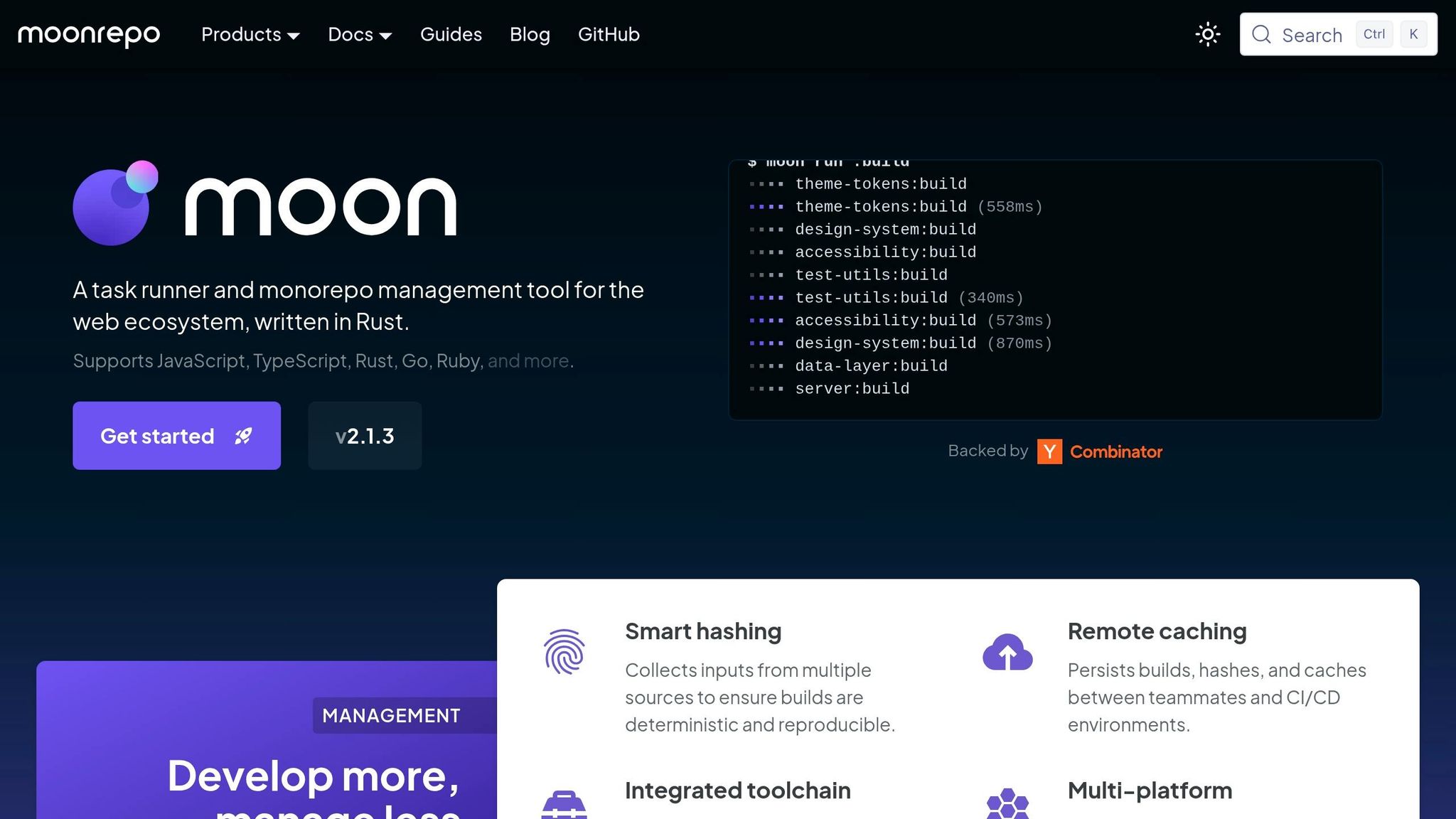
While some tools dominate the monorepo space, others cater to more specific needs. Moon, Pants, and Rush are excellent examples of tools designed for particular scenarios. Moon, built with Rust, strikes a balance between the simplicity of Turborepo and the power of Bazel. It offers task orchestration, both local and remote caching through its moonbase feature, and built-in toolchain management. For example, Moon can automatically install specific versions of Node.js, Bun, or Rust, which helps eliminate configuration inconsistencies.
Pants, on the other hand, excels in managing polyglot repositories, particularly those centered around Python, Go, or JVM projects. One of its standout features is automatic dependency inference, which reduces the burden of maintaining build files manually. Meanwhile, Rush, part of Microsoft's Rush Stack, is tailored for enterprise-scale projects. It focuses on strict governance, deterministic installations, and controlled deployment processes - ideal for organizations where these factors are as critical as build speed.
"Moon is the modern middle ground... for teams who want more structure than Turborepo, more toolchain management than Nx usually foregrounds, and far less conceptual weight than Bazel." - Steve Kinney
Moon uses YAML-based configuration files (moon.yml) and supports languages like JavaScript, TypeScript, Rust, Go, and Python. In some cases, it outperforms Turborepo while still offering Bazel-like accuracy without the steep learning curve. These tools expand the range of options available, ensuring teams with varied needs and language requirements can find a suitable solution.
When Moon, Pants, or Rush Fit Better
Choosing the right tool depends on your project's specific needs:
- Moon: Ideal for polyglot repositories that require consistent tool versions.
- Pants: Best for multi-language codebases, particularly those heavy on Python, offering Bazel-like performance with a simpler setup.
- Rush: Perfect for enterprise environments where strict package management and controlled release workflows are essential.
Rush is especially effective in setups that demand rigorous package governance. Each of these tools brings unique strengths to the table, making them worth considering for specialized use cases.
CI/CD for Monorepos: Caching and Build Optimization
Monorepo tools shine in CI/CD pipelines, where strategies like remote caching and affected-only builds can drastically cut down build times. Imagine reducing a 30-minute pipeline to just 2 minutes by skipping redundant tasks - this is the kind of efficiency these tools offer. For a team handling 50 pull requests daily, with each build taking 30 minutes, an 80% cache hit rate could save more than 20 hours of build time every single day. Let’s break down how caching and affected-only builds make this possible.
How to Cache Monorepo Builds
Local caching speeds up repeated builds by storing task outputs on a developer’s machine, often achieving 50–80% faster builds. Remote caching takes this a step further by sharing those outputs across the entire team and CI/CD pipelines. Here’s how it works: monorepo tools calculate a hash based on source files, dependencies, and configurations. If nothing has changed, cached outputs are restored instead of rebuilding from scratch.
For example, Bazel often requires setting up a self-hosted remote cache server using services like Amazon S3 or Google Cloud Storage. While this adds infrastructure costs, Bazel’s fine-grained caching - which works at the "action level" instead of just the "task level" - is especially effective for handling massive codebases.
To maximize cache efficiency, exclude irrelevant files (like Markdown files or test specs) from the build hash. Using content-based hashing tools such as hashFiles ensures consistent cache hits, regardless of the commit ID (e.g., avoiding github.sha-based identifiers). Debugging cache misses? Enable detailed logs with environment variables like TURBO_LOG_VERBOSITY=1 or NX_VERBOSE_LOGGING=true. These logs can help pinpoint issues like unexpected environment variable changes or mismatched timestamps.
Setting Up Affected-Only Builds
Affected-only builds take caching principles even further by focusing on what’s changed. These builds use a project dependency graph to identify changes since the base commit (like main), rebuilding only the affected projects and their dependents. For instance, Turborepo uses the --filter flag to implement this logic (e.g., turbo run build --filter=[HEAD^1]). Similarly, Nx provides a built-in nx affected command to analyze project dependencies and determine which parts of the codebase need rebuilding. Bazel, on the other hand, requires custom logic using bazel query or external tools like target-determinator.
In CI environments, ensure accurate base branch comparisons by setting fetch-depth: 0. Tools like nrwl/nx-set-shas can track the last successful build, and when combined with remote caching and affected-only builds, pipeline times can drop by as much as 60–80% for large repositories.
How to Migrate from Polyrepo to Monorepo
Shifting from multiple repositories to a monorepo setup is no small task - it requires careful planning and a step-by-step approach. The key to success lies in preparing your infrastructure first and then gradually migrating code while keeping your team's workflow as smooth as possible.
Planning the Migration
Start by evaluating your current repositories. Identify shared dependencies, overlapping configurations, and projects that frequently interact. Look for duplicate utilities, TypeScript types, or ESLint configurations across repos - these should be consolidated into a shared packages/ directory. When choosing tools, consider your team's size and complexity. For most JavaScript/TypeScript teams in 2026, pnpm workspaces combined with Turborepo is a solid choice for dependency management and task orchestration. If you're working with 10+ packages or have a larger team, Nx might be a better fit due to its advanced code generation and dependency graph features.
Before moving any code, decide on a folder structure. A common setup is to place applications in an apps/ directory and shared packages in a packages/ directory, all managed under a unified package.json and lockfile. Take the time to document naming conventions, linting rules, and architectural boundaries early on - this will save you from chaos down the road.
Once the plan is in place, begin migrating projects one at a time.
Running the Migration
Start by setting up your build system. Use commands like npx turbo init or npx nx@latest init to configure your workspace structure automatically. Next, create shared packages for common configurations, such as @company/eslint-config or @company/tsconfig, to maintain consistency across projects.
When migrating individual projects, use git subtree to preserve commit history. For instance, the following command:
git subtree add --prefix=apps/[app-name] [repo-url] main
This imports an existing repository into the monorepo, keeping its full commit history intact. Update each project's package.json to use the workspace:* protocol for internal dependencies. This ensures that applications link to local source code instead of pulling from a registry. Submit each migration as a separate pull request so you can easily roll back if needed.
Reconfigure your CI/CD pipelines to accommodate the monorepo setup. Use commands like turbo build --filter=...[HEAD^1] or nx affected for affected-only builds. To speed up builds, enable remote caching with tools like Vercel Remote Cache or Nx Cloud. This can drastically cut build times - for example, an 8-minute rebuild could drop to just 30 seconds.
Once all projects are migrated, shift your focus to optimizing the new monorepo environment.
After the Migration
With the migration complete, it's time to fine-tune your team's workflows and infrastructure. Unified versioning can reduce dependency-related bugs by 40%, but this only works if your team fully understands the new setup. Schedule training sessions to cover critical topics like caching, the importance of the workspace:* protocol, and debugging cache misses using verbose logging (e.g., TURBO_LOG_VERBOSITY=1 or NX_VERBOSE_LOGGING=true). Document workflows for tasks like adding new packages, running affected tests, and visualizing the dependency graph with commands like nx graph or turbo graph.
Automate versioning with tools like @changesets/cli to handle semantic versioning and generate changelogs across all packages simultaneously. Keep an eye on your root lockfile to avoid "dependency bloat", where unused versions linger unnecessarily. Finally, after a two-week stable period in the new monorepo, archive or delete your old polyrepos. This ensures you have a safety net while also preventing confusion with outdated CI configurations or scripts.
When to Avoid Monorepos
While monorepos can offer numerous advantages, they aren't always the right choice. In fact, trying to implement a monorepo in the wrong context can lead to more problems than solutions. Even though 63% of companies with 50 or more developers rely on monorepos as of 2025, 37% continue to use polyrepos - and for good reasons. Knowing when not to adopt a monorepo can save your team from unnecessary headaches.
Common Monorepo Problems
Git operations slow down as repositories grow. When a monorepo becomes massive, Git struggles to keep up. This is especially true if the repository includes large binaries, such as video files, machine learning models, or compiled artifacts. Without specialized tools, these issues can quickly spiral out of control.
Access control becomes more complicated. Unlike polyrepos, where permissions are managed per repository, monorepos require intricate folder-level restrictions. This can create challenges, especially when working with external contractors or distributed teams.
Increased complexity with tooling. Monorepos demand advanced orchestration tools like Nx, Turborepo, or Bazel to manage builds efficiently. While these tools are powerful, they come with steep learning curves and maintenance requirements. For example, Bazel is notoriously difficult to master, and even Nx requires significant training and setup time. As one DevTools Guide editorial puts it:
The biggest monorepo mistake is adopting heavy tooling prematurely. A team of three with four packages does not need distributed task execution.
Cache invalidation can cause issues. If your build processes rely on external factors - such as API endpoints, database schemas, or environment variables - not explicitly declared in your configuration, caching can fail. This can lead to incorrect builds or circular dependencies, which complicate development and increase the likelihood of errors.
These challenges explain why some teams prefer to stick with polyrepos.
Why Some Teams Should Keep Polyrepos
Autonomous teams benefit from reduced coordination overhead. Teams that own their release schedules, work on loosely coupled services, and rarely need synchronized changes often find monorepos unnecessary. Polyrepos align better with Conway's Law, as they reflect the natural structure of independent, distributed teams.
Heterogeneous tech stacks are better suited to polyrepos. When teams use a mix of languages and tools - like Python, Swift, and Terraform - managing everything in a single monorepo can be inefficient. Polyrepos allow each team to optimize their CI/CD pipelines and workflows without being constrained by a one-size-fits-all approach.
Small teams don’t need the complexity. If you’re a team of just 2–3 developers managing a handful of packages, a monorepo can feel like overkill. Simple tools like pnpm or Bun for workspace linking, or even separate polyrepos, are often sufficient until the need for code sharing outweighs the benefits of simplicity.
Here’s a quick comparison to help clarify when each approach works best:
| Factor | When Monorepo Struggles | When Polyrepo Excels |
|---|---|---|
| Team Autonomy | Requires shared conventions | Full independence for each team |
| Access Control | Harder to restrict specific folders | Native per-repo permissions |
| Git Performance | Degrades at massive scale | Always fast due to smaller size |
| Tech Stack | Forces standardization | Supports heterogeneous tools |
| Onboarding | Must clone entire codebase | Clone only necessary projects |
Conclusion
Picking the right monorepo tool in 2026 largely hinges on your team's size and the mix of programming languages you're working with. If switching tools is relatively easy for your setup, it’s best to start with a straightforward option and only upgrade when your needs surpass your current setup.
Here’s a quick breakdown of how the top tools measure up based on team scale and dependency complexity:
- For JavaScript/TypeScript teams managing between 5 and 50 packages, Turborepo is a practical choice. It offers quick builds, minimal configuration, and an easy learning curve.
- If your team grows beyond 10 packages and requires advanced features like code generation, architectural rules, or plugin support, Nx becomes an excellent option.
- For teams handling thousands of packages across multiple languages with dedicated build systems, Bazel is the go-to solution.
Remote caching is another game-changer. Whether it’s Vercel for Turborepo or Nx Cloud for Nx, caching can make builds up to 10x faster. This boost is essential for keeping development cycles agile and CI workflows efficient.
That said, monorepos come with their own challenges. Without the right tools, they can amplify risks. However, when matched to your team’s scale, they can reduce dependency-related bugs by 40% and significantly improve developer productivity.
Still stuck managing multiple repositories with versioning headaches or sluggish cross-project updates? For actionable migration tips, check out our guide on how we reduced our React monorepo CI time by 70%. It’s packed with practical strategies to ease the transition.
FAQs
Should my team use a monorepo or polyrepo?
In 2026, deciding between a monorepo and a polyrepo comes down to factors like team size, project complexity, and specific development goals.
- Monorepos shine when shared dependencies, atomic changes, or close collaboration are priorities. They're particularly useful for larger teams or projects that require tight integration across components.
- Polyrepos are a better fit for smaller teams or projects that operate independently, especially when deployment cycles vary.
When making your choice, weigh aspects like interdependencies, build performance, and the complexity of the initial setup. Each approach has its strengths based on your project's unique demands.
Which tool fits us: Turborepo, Nx, or Bazel?
When it comes to choosing the right monorepo tool, it all boils down to what your team needs and the scale of your projects.
- Turborepo: Perfect for smaller teams, this tool shines with its simplicity, speed, and minimal setup. It’s a straightforward option that gets the job done without much hassle.
- Nx: If you're dealing with larger projects, Nx is a solid choice. It provides advanced features like plugins and dependency management, making it a go-to for more complex setups.
- Bazel: For massive and intricate builds, Bazel is hard to beat. While it’s powerful, be prepared for a steeper learning curve due to its complexity.
Ultimately, the best tool for you will depend on your project's size, complexity, and the features you need.
How can we speed up CI with caching and affected builds?
To speed up Continuous Integration (CI), modern monorepo tools rely on techniques like build caching, affected commands, and incremental builds.
- Build caching: This involves storing build artifacts in a central location, which eliminates the need to rebuild the same components repeatedly.
- Affected commands: These identify which parts of the codebase have changed and run tasks only on the projects impacted by those changes, saving time and resources.
- Incremental builds: By reusing outputs from previous builds, this approach avoids starting from scratch, drastically cutting rebuild times.
When combined, these methods can significantly reduce CI times, streamlining workflows and boosting productivity.