RAG uses retrieval, embeddings, and reranking to ground LLM answers, cut hallucinations, and keep knowledge current.
RAG is how I give an AI model access to the right documents at the moment it answers. Instead of relying only on training data, I let the system search my docs, pull the best chunks, and answer from that context.
Here’s the short version:
- RAG helps with three common problems: made-up answers, old training data, and missing private company knowledge
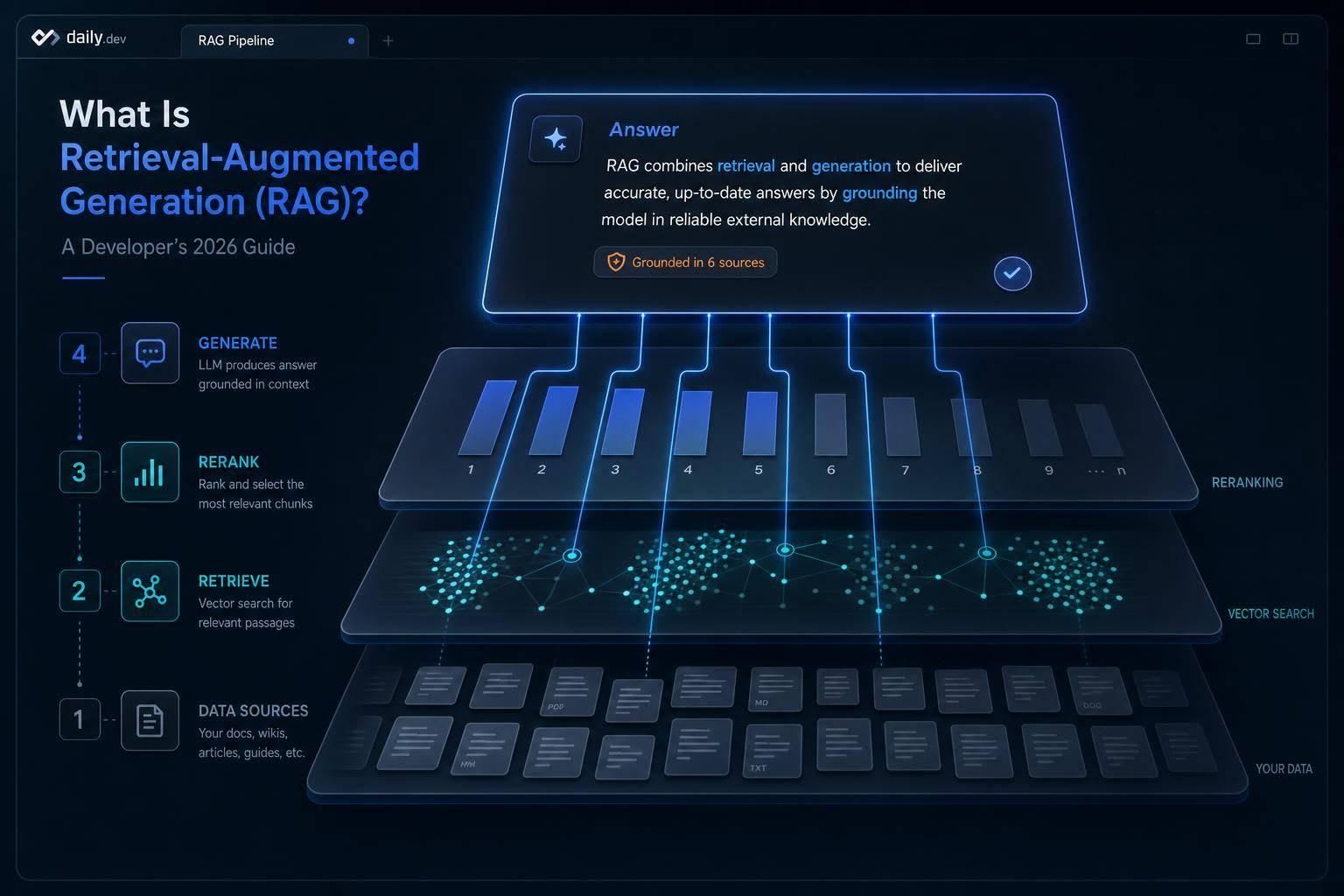
- The basic flow is simple: chunk documents, create embeddings, store vectors, retrieve matches, rerank them, and generate an answer
- Chunking matters a lot: many teams use 300–500 token chunks with 10%–20% overlap
- Hybrid search often works better than vector-only search: it mixes semantic search with keyword search like BM25
- Reranking is often the best single pipeline upgrade: it can improve answer quality by 20%–30%
- Long context windows do not remove the need for retrieval: in practice, usable context is often only 25%–50% of the stated limit
- RAG and fine-tuning solve different problems: RAG handles changing facts; fine-tuning handles behavior, tone, and output format
- Most failures start before generation: bad parsing, weak chunking, poor filters, and low-quality retrieval usually do more damage than the model itself
- Good evaluation is stage-by-stage: check retrieval quality, groundedness, citation accuracy, latency, and cost
In other words: RAG is less about making the model smarter and more about making its answers better tied to your data. If I need current docs, internal knowledge, or source-backed answers, RAG is often the first setup I would use.
That’s the core idea behind this guide.
What RAG is and how it works
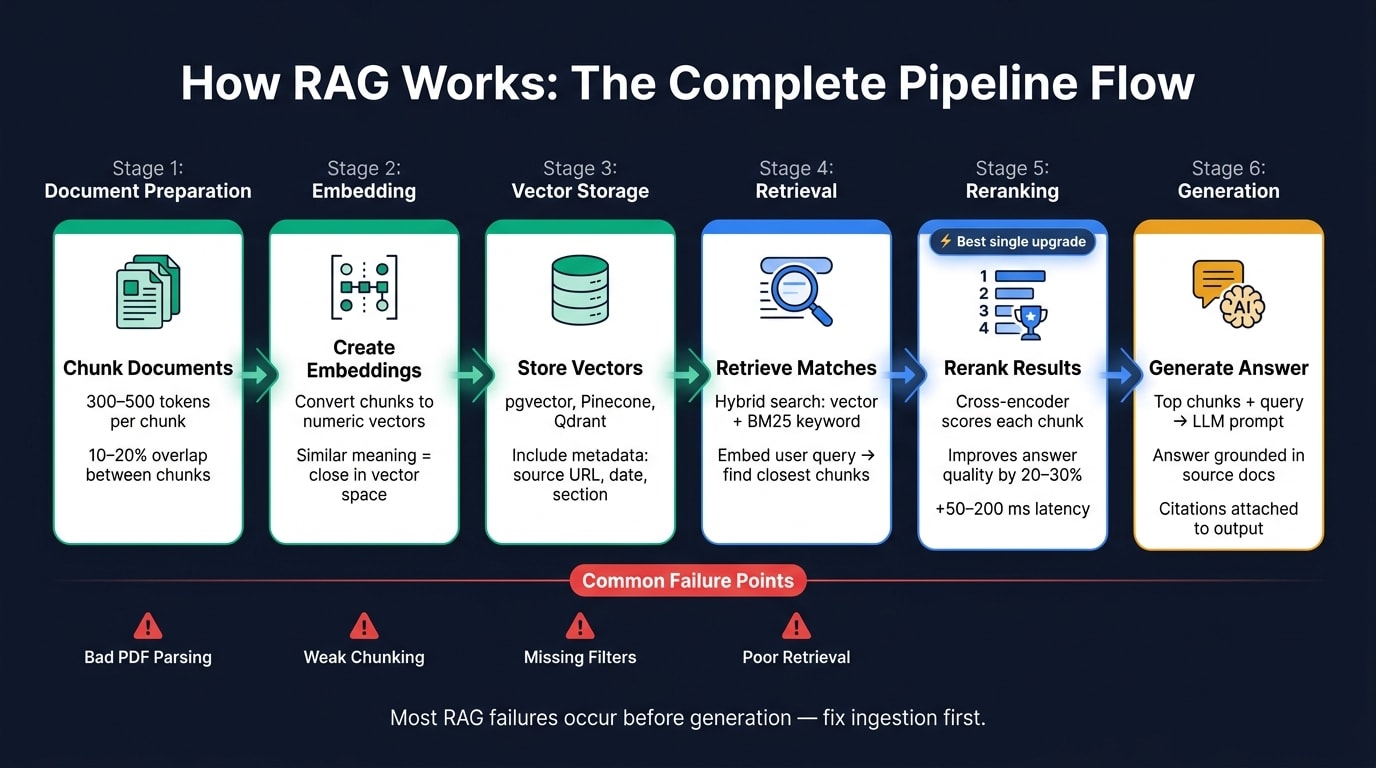
RAG follows a simple two-step pattern: first, it pulls relevant documents from an external store. Then it sends those documents to a language model so the answer is grounded in that context.
The model works with two kinds of memory. Memory stored in the model's weights is set during training. The external document index is the store you query at runtime, such as internal wikis, API docs, customer tickets, or other private data. That split matters. It lets RAG use knowledge the model didn't learn during training. The retrieval pipeline is the part that turns that outside knowledge into an answer.
Why language models need external knowledge
A trained model won't know about recent releases, internal docs, or private contracts. So when you need current or private information, retrieval is the practical route.
The basic RAG request flow
At query time, RAG uses a search-then-generate flow:
- Query embedding - the query is turned into a vector, sometimes after a rewrite or expansion step.
- Retrieval - a vector database finds the chunks that are closest in meaning. Hybrid search often mixes vector search with keyword search, including BM25 for exact matches.
- Reranking - a second model scores the retrieved chunks again so the best context moves to the top. This step can improve answer quality by 20% to 30%.
- Generation - the top chunks are added to the prompt with the original question, and the model writes an answer tied to the source text, ideally with citations back to the source documents.
A simple example of retrieval plus generation
Here's what that looks like in practice. A developer asks a product question, often about API documentation. The docs are chunked, embedded, and stored in a vector database like Pinecone or Weaviate.
Say the developer asks, "What's the rate limit for the /events endpoint?" The system embeds the query, pulls the chunks most relevant to rate limits for that endpoint, and passes them to the model. The model then returns an answer tied to the source text, along with citations.
The core parts of a RAG system
Building RAG means doing two things well: preparing documents ahead of time and retrieving the right parts at query time. That split is what separates a quick demo from something people can use in a live system .
Chunking, metadata, and document preparation
Once the retrieval loop is clear, the next job is getting your content into shape so the model can pull from it cleanly.
Before retrieval starts, documents need to be parsed and broken into chunks. Most production setups land around 300–500 tokens per chunk, with 10–20% overlap between neighboring chunks. That overlap helps stop context from getting chopped off at the edges .
How you split matters more than many teams think. Don’t break up code blocks or tables. And don’t just slice text at a fixed character limit. It’s better to use recursive splitters that follow the document’s structure - headings, sections, and paragraphs - so each chunk still makes sense on its own.
Ingestion is where a lot of RAG systems go off the rails. If the chunks are bad, retrieval will be bad too.
Metadata gives each chunk a paper trail. Store the source URL, section path, and last-modified date so you can filter results, trace where a chunk came from, and attach citations that point back to the source.
Embeddings and vector storage
After documents are split, each chunk gets turned into a vector so related ideas sit near each other.
An embedding model converts a chunk into a numeric vector that represents its meaning. Chunks with similar meaning end up close together in vector space, which is what powers semantic search. The embedding model you pick affects retrieval quality, cost, and support for many languages.
For storage, common options include pgvector for Postgres, Pinecone for managed hosting, and Qdrant when you need filtered retrieval at scale.
Retrieval, reranking, and answer assembly
When a user sends a query, the system flips from prep work to search.
It embeds the user’s question, then pulls the top matches from the vector store. Vector search is fast. But hybrid search does a better job with exact matches, so it’s often the default when those queries matter .
Reranking is often the best upgrade you can add to a RAG pipeline for the money. Retrieval brings back a set of candidate chunks, then a reranker scores each chunk against the query with much more precision than the first-pass vector search. Common rerankers include Cohere Rerank, Voyage Rerank, and open-source BGE rerankers. This step helps fix a common problem: text that looks close in meaning but doesn’t answer the question well .
Prompt assembly turns those retrieved chunks into grounded input for generation. A common pattern is to wrap chunks in XML or JSON tags, add source metadata before each one, and include a strict grounding instruction. That helps keep the model tied to the retrieved material instead of drifting back to what it learned during training.
With these parts in place, the next step is figuring out when RAG beats fine-tuning.
RAG vs fine-tuning: when to use each
RAG and fine-tuning fix different kinds of problems. RAG changes what the model can access at runtime. Fine-tuning changes how the model responds. So the main question is pretty simple: are you dealing with changing facts or changing behavior?
RAG vs fine-tuning for common developer use cases
RAG makes sense when your knowledge changes often or when you need to search a large body of content that won't fit cleanly into the context window. Think customer support bots, internal knowledge bases, product manuals, and FAQs. Those things change all the time. Retraining a model every time a policy gets updated just doesn't make much sense. With RAG, you update the index and move on.
Fine-tuning is a better fit when the issue is behavior. If the model keeps ignoring your output format, returns messy JSON, or slips away from a set brand tone even after careful prompting, fine-tuning can lock that behavior in. It teaches style and structure, not facts.
RAG also has a clear advantage when you need source attribution. It can attach a source URL or document reference to each answer. That matters a lot in legal, healthcare, and compliance settings.
When you need both current facts and fixed structure, a hybrid setup is often the best middle ground.
| Feature | RAG | Fine-Tuning | Hybrid (RAG + fine-tuning) |
|---|---|---|---|
| Data Freshness | High (real-time updates) | Low (requires retraining) | High (RAG layer handles updates) |
| Private Knowledge Access | High (external database) | Moderate (risk of data leakage) | High (externalized facts) |
| Style/Behavior Control | Low (prompt-dependent) | High (baked into model) | High (fine-tuning for style, RAG for facts) |
Do long context windows remove the need for RAG
Long context helps, but it doesn't replace retrieval.
Long-context models are now common. But attention tends to weaken when details are buried in the middle of a long prompt. That's the "lost in the middle" effect. On top of that, effective context length in live workloads is usually only 25%–50% of the advertised limit. Selective retrieval tends to give more precise and more current answers than stuffing a huge context window with everything that might matter.
If retrieval still falls short, the problem is usually in the pipeline, which the next section covers.
When a hybrid approach makes sense
In production, the middle ground is often a hybrid approach. Use fine-tuning to lock in response structure, output format, or brand voice. Use RAG to supply the facts.
For example, a customer-facing assistant might be fine-tuned to answer in a set tone and follow a consistent structure, while RAG pulls the current product manuals at query time.
For most teams, RAG alone is the best place to start. It's faster to prototype and easier to update. Add fine-tuning only if prompt engineering keeps falling short and you still can't get the behavior you need.
Common failure modes and how to evaluate RAG
Once you know when to use RAG, the next step is simpler: does it hold up in production?
What causes bad RAG answers
Most bad RAG answers don’t start with hallucination. They start much earlier, during ingestion and indexing. If PDF parsing is messy or fixed-size chunking splits up meaning, the system loses context before retrieval even begins.
Retrieval brings a different set of problems. Hybrid search matters here. Dense retrieval can miss exact terms, while BM25 can miss paraphrased language. Filters matter too. If tenant, date, or permission filters are missing, the system can pull in stale or unauthorized documents. There’s also embedding-corpus mismatch: the query may look fine, but the right document still stays hidden because the embeddings don’t line up well with the data.
Generation can also fall apart, especially when the prompt is overloaded or the instructions are weak. Models often miss proof buried in the middle of a long prompt. And when the assembled prompt goes past the model’s context window, earlier evidence gets cut off. A strict prompt helps: answer only from the provided context; otherwise say you don’t know.
The symptoms tend to look familiar:
- fluent but wrong answers
- missing answers
- irrelevant citations
- stale or contradictory output
How teams measure whether RAG is working
The best way to debug RAG is to check each stage on its own: chunking, retrieval, and generation. When you isolate the break, you find the problem much faster.
| Stage | Metric | What It Catches |
|---|---|---|
| Chunking | Context Recall | Answer-bearing chunk is missing or mangled |
| Retrieval | Context Precision / Relevance | Wrong chunks surfaced or too much noise |
| Retrieval | Chunk Utilization | Retrieved chunks that never make it into the final answer |
| Generation | Faithfulness / Groundedness | Model fabricating from the model's trained knowledge |
| Generation | Citation Correctness | Fabricated citations pinned to real chunk IDs |
| Cross-cut | Factual Accuracy | Stale source data or hallucinated quotes |
Teams also track TTFT and cost per request. Both can climb fast as embedding calls, vector storage, and longer prompts stack up.
For tooling, teams often use LangChain, LlamaIndex, Haystack, or DSPy for orchestration. Then they pair that with an eval harness like RAGAS, LangSmith, or Langfuse, plus a regression set of 50–200 hand-labeled query/answer pairs. Every chunking or prompt update should run against that set in CI before release.
In practice, the fix is usually upstream. Clean the data first. Then fix retrieval. Then look at generation.
Key takeaways
- The core RAG stack includes chunking, embeddings, a vector store, retrieval, reranking, and generation. Any one of those parts can fail on its own.
- Long context can help, but retrieval still works better than stuffing every relevant chunk into one prompt.
- Most quality issues come from data prep and retrieval design, not the model itself. Fix ingestion first, then retrieval, then generation.
- Adding a cross-encoder reranker is often the best quality upgrade for production pipelines, with answer quality often improving by 10–25% for 50–200 ms of added latency.
FAQs
How do I know if my app needs RAG?
Use RAG when your app needs to pull from specific data that changes often or lives in private systems the model never saw during training. It’s the go-to option for knowledge assistants, document Q&A, and support bots that need accuracy, source attribution, and auditability.
Even if a model has a long context window, RAG is often more cost-effective, faster, and more precise when you’re working with large datasets. It helps you keep information current without retraining the model. Use fine-tuning for a different job: shaping writing style, tone, or tool-use behavior.
What should I build first in a basic RAG stack?
Start with a minimal stack and add more pieces only when you need them: Next.js API routes, LangChain or LlamaIndex, and PostgreSQL with pgvector or ChromaDB.
For the pipeline, use recursive character chunking at 400 tokens with 100-token overlap. Then use a dedicated embedding model like BGE or text-embedding-3-small, and apply cosine similarity to pull the top 3–5 chunks for the LLM to answer from the provided context.
How often should I reindex my documents?
Reindex your documents whenever the source data changes so your knowledge base stays up to date.
To cut compute costs and avoid downtime, use incremental ingestion. Store a stable content hash for each chunk, then re-embed only the chunks that changed. Keep offline indexing separate from the online query path, so updates don't interrupt users.