Vibe coding turns English prompts into production-ready code fast, but it demands rigorous review to avoid security and maintenance traps.
Vibe coding is a way of building software by describing what you want in plain English, letting AI generate the code, and then refining it based on feedback. Instead of focusing on writing every line of code, developers act as "directors", guiding the AI's output. This approach is faster, with AI now responsible for 41% of all global code written. It’s popular for prototyping, automating tasks, and creating internal tools but requires careful review to avoid issues like debugging difficulties, security risks, and growing complexity.
Key Points:
- How It Works: Describe → Review → Run → Iterate.
- Tools Used: Cursor, Claude Code, GitHub Copilot, and more.
- Best For: Prototyping, solo builders, and learning new frameworks.
- Challenges: Debugging, security flaws, and code maintenance.
Vibe coding is transforming software development, but success depends on balancing AI speed with human oversight.
The Origins of Vibe Coding
Who Coined the Term?
On February 2, 2025, Andrej Karpathy shared a post on X that reshaped how developers think about coding workflows. In it, he explained his approach while developing a prototype called MenuGen. Using Cursor's Composer mode, Anthropic's Claude model, and voice dictation via SuperWhisper, Karpathy introduced a new way of interacting with AI-generated code. Instead of meticulously reviewing each line of code, he focused on error messages and execution results to refine his next prompt. The simplicity and efficiency of this method struck a nerve, with the post amassing over 4.5 million views .
Karpathy's explanation resonated widely. He described his process bluntly:
"I just type what I want, see what I get, copy-paste error messages, and don't bother to understand the code." - Andrej Karpathy
This approach was soon labeled "vibe coding", giving a name to a practice many developers had already been experimenting with. The concept quickly gained traction. Today, over 110,000 developers search for the term monthly, and a $4.7 billion industry has emerged around tools designed to support this workflow . Karpathy’s insights marked a turning point, fueling the rapid evolution of AI-driven development.
How AI in Development Has Evolved
Karpathy’s workflow emerged at a time when AI tools were advancing at breakneck speed, ushering in a series of transformations in how developers write code. Over just a few years, these advancements have redefined what’s possible, with each phase building on the last.
| Era | AI Capability | What Developers Could Do |
|---|---|---|
| 2021–2022 | Smart Autocomplete | AI suggested the next line or completed boilerplate code |
| 2023 | Chat-in-Editor | Developers pasted code into chat windows for refactoring or explanations |
| 2024 | Prompt-to-App | A single sentence could generate a working frontend or full-stack prototype |
| 2025–2026 | Autonomous Agents | Tools like Cursor Composer and Claude Code planned multi-file changes, ran terminal commands, and iterated on errors independently |
The leap between 2024 and 2025 was particularly transformative. AI tools became capable of making multi-file edits and autonomously resolving errors, turning Karpathy’s vision into a practical reality. Back in 2023, Karpathy had predicted this shift, famously saying, "The hottest new programming language is English" . That statement has aged well.
The influence of vibe coding became even more apparent in January 2026, when Linus Torvalds - creator of Linux - used Google Antigravity to vibe-code a Python visualizer for his AudioNoise project. In the README file, he acknowledged that the tool was "basically written by vibe-coding." This quiet nod from one of software engineering’s most respected figures underscored the growing legitimacy of this approach .
How Vibe Coding Works Day to Day
Describing Intent in Natural Language
Vibe coding shifts the focus from syntax to intent. Developers act more like product directors, defining what they want to achieve rather than detailing every step. The AI takes over from there, handling the implementation .
Here’s how it works: you might type something like, "build a billing webhook that listens for Stripe events and updates the user's subscription status in Postgres." That’s it. The AI processes the request and drafts a working solution.
When it comes to structuring prompts, developers generally take one of two paths. Some prefer a spec-first approach, creating a markdown file that outlines goals, architecture, and constraints before any code is generated. Others go for comment-based prompting, where they leave a detailed comment in the code, and the AI writes the implementation below it. Both methods provide the AI with enough context to make informed decisions instead of guessing .
Another helpful strategy involves using references like @codebase, @file, or @docs to anchor the AI within the project. These tools give developers more control over the AI’s output, reinforcing their position as directors rather than executors in the coding process .
Iterating with AI Assistance
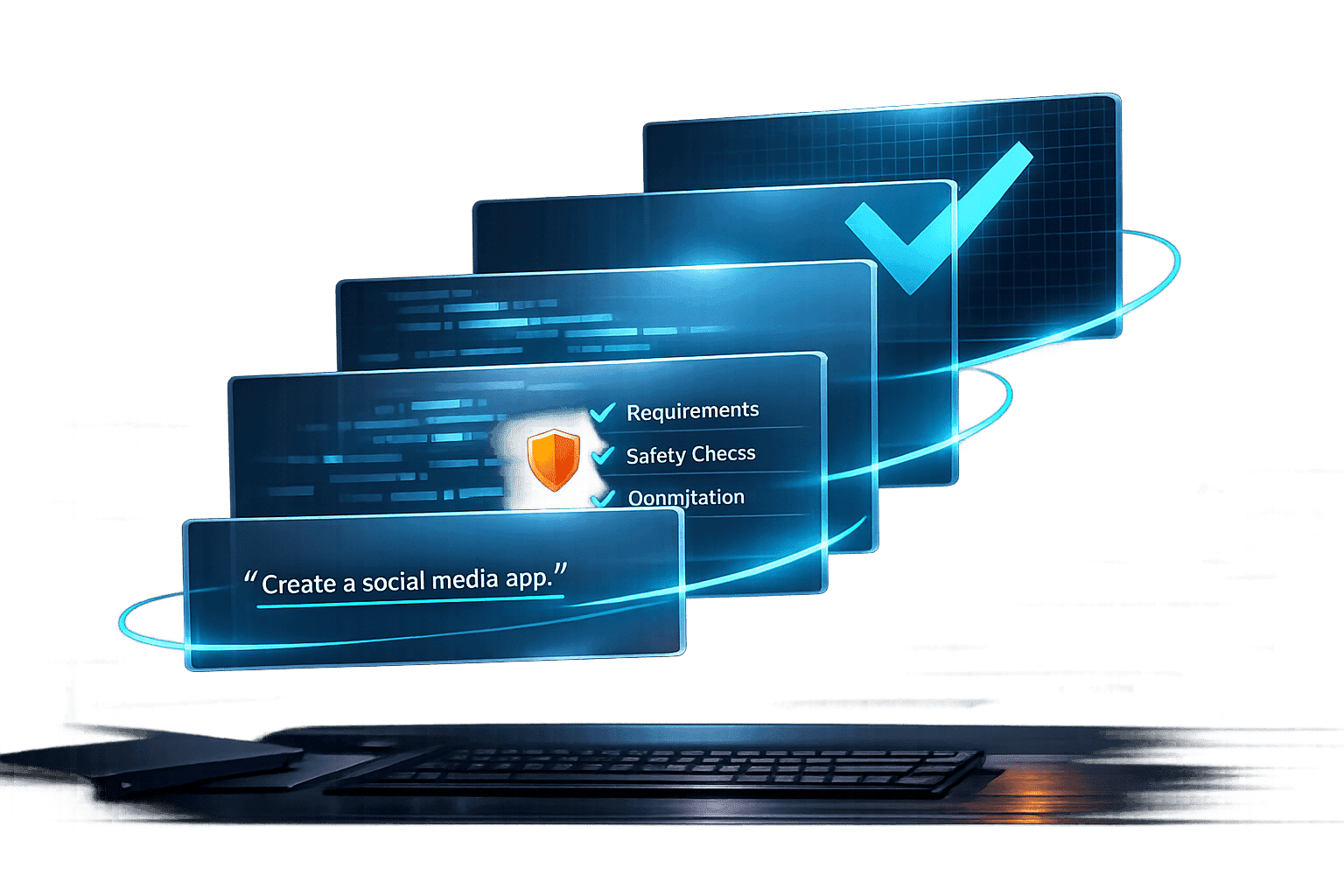
The workflow revolves around a tight feedback loop: Describe → Review → Run → Iterate. You start by prompting the AI, review the changes it suggests, test the code, and then use any errors or unexpected behavior as inputs for the next prompt . Each cycle sharpens the output based on specific feedback.
Certain practices can make this process smoother. For instance, asking the AI to "make the smallest possible change" ensures it doesn’t touch functioning code unnecessarily. Another tip is to have the AI plan its actions before executing them - listing which files it will modify and why - so you can catch any flawed assumptions early. And by working on a new Git branch for major changes, you’ll always have a way to roll back if something goes wrong .
"Vibe coding works when the cost of a wrong answer is low and the feedback loop is fast - and breaks the moment either of those flips." - Imtiaz Rayhan, Founder of SurePrompts
This fast feedback loop is what makes vibe coding so effective in situations where speed is a priority, as outlined below.
Common Use Cases
Vibe coding isn’t a one-size-fits-all solution. It thrives in scenarios where speed trumps precision and the feedback loop is quick.
| Use Case | Why It Works Well |
|---|---|
| Prototyping an MVP | Enables rapid iteration with minimal risk. |
| Internal tools and dashboards | Limited scope and predictable data make it efficient. |
| Automation scripts | Clear inputs and outputs simplify success criteria. |
| Frontend UI from a design | Visual feedback speeds up adjustments. |
| Exploring an unfamiliar library | AI scaffolds usage patterns, reducing the need for deep documentation dives. |
This iterative process powers faster development, allowing standard CRUD features to be built 5–10x quicker and boosting the overall shipping speed of indie SaaS projects by about 3–5x . In fact, by the time Y Combinator’s Winter 2025 batch presented, 25% of startups were running codebases that were 95% AI-generated .
The ideal scenarios for vibe coding are those where mistakes are low-stakes and results are quickly visible. But when stakes rise - like in production infrastructure, critical security logic, or a large, complex codebase - the workflow needs to adapt. Choosing the right context is key to making vibe coding work effectively. Up next, we’ll dive into the tools that make this approach possible.
Top Tools for Vibe Coders
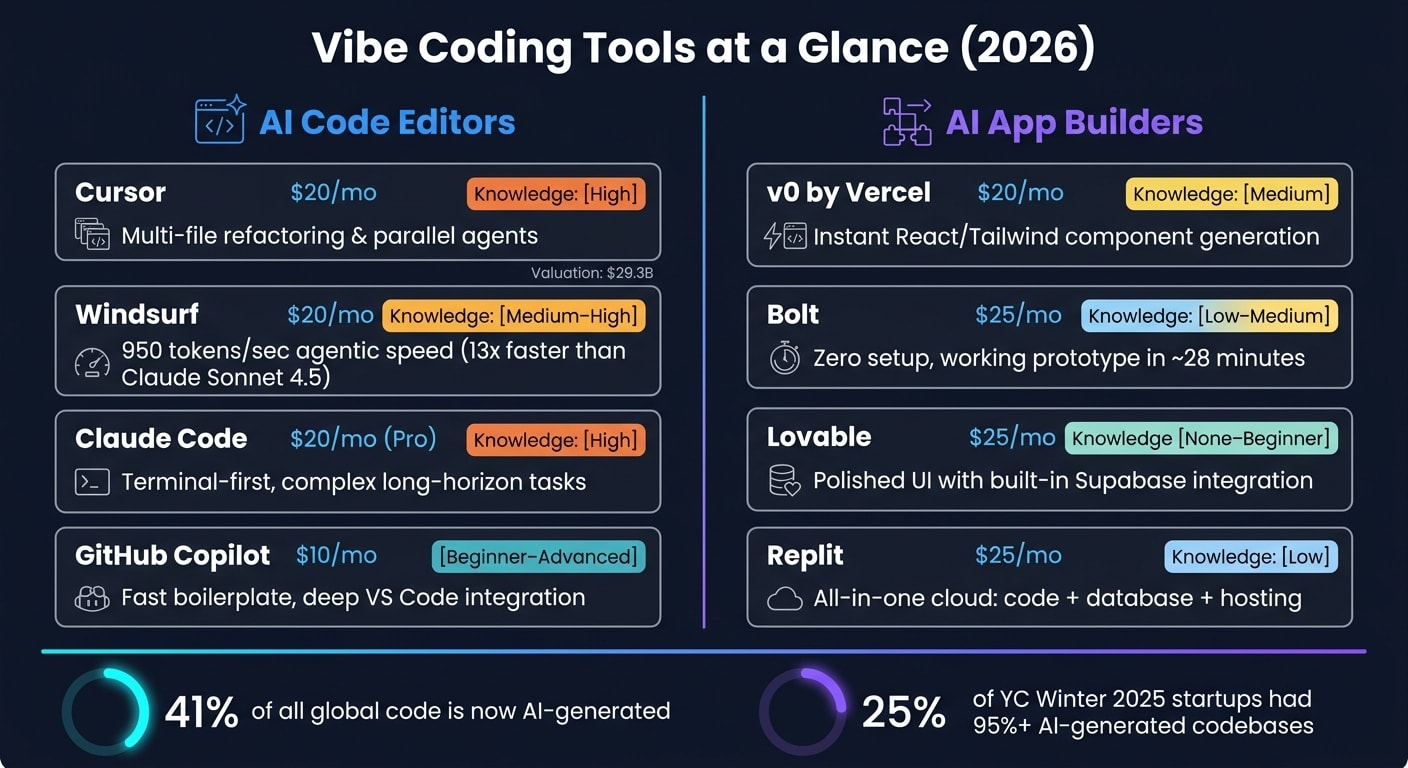
The vibe coding landscape is divided into two main categories: AI code editors, which integrate into traditional development workflows, and AI app builders, designed to create complete applications directly in the browser. Picking the right tool can streamline your process and avoid unnecessary headaches.
AI Code Editors
These tools are ideal for developers comfortable with coding but looking for AI-powered assistance to simplify repetitive or complex tasks.
Cursor is a standout IDE-based tool in the vibe coding space. By March 2026, it had reached a valuation of $29.3 billion. Cursor’s features, like the "Composer" for multi-file edits and "Parallel Agents" for background tasks, make tasks like multi-file editing more efficient. The Pro plan costs $20/month.
Windsurf offers a "Cascade" agentic mode and uses the SWE-1.5 model, which processes 950 tokens per second - about 13 times faster than Claude Sonnet 4.5. Priced at $20/month, it’s a good choice for those exploring agentic workflows for the first time.
Claude Code takes a terminal-first approach, making it perfect for developers tackling large-scale, long-term projects. Redis creator Antirez used Claude Code to develop "flux2.c", a pure C image generation model, without manually writing code - relying entirely on system expertise . Claude Code is included with the Claude Pro plan for $20/month.
GitHub Copilot is one of the most accessible options, priced at $10/month. Its deep integration with VS Code makes it great for generating boilerplate code quickly, though it may not handle multi-file contexts as effectively as some other tools.
AI App Builders
For those who want to skip traditional coding environments, these platforms focus on speed and simplicity. Just describe what you need in plain language, and the tool handles the rest - from infrastructure to hosting and database setup.
v0, created by Vercel, specializes in generating reusable React and Tailwind components instantly. It’s perfect for frontend developers working in the Next.js ecosystem. A free tier is available, with a premium plan costing $20/month.
Bolt works entirely in the browser, turning prompts into working prototypes in about 28 minutes . Its zero-setup environment and instant shareable URLs make it a favorite for quick prototyping. However, debugging can rack up token usage quickly. The Pro plan costs $25/month.
Lovable caters to non-technical users who need polished, production-ready apps. It excels in creating high-quality UI with built-in Supabase integration. However, a security issue in February 2026 exposed 18,697 user records due to inverted authentication logic , highlighting the need for manual review of AI-generated authentication flows. Lovable’s Pro plan is priced at $25/month.
Replit offers an all-in-one cloud environment, making it popular for learning and team collaboration. With code, database, and hosting all in one place, it’s convenient but can lead to platform lock-in, making project migration tricky. The core plan costs $25/month.
Tool Comparison Table
| Tool | Primary Use Case | Coding Knowledge Required | Prototyping Strength | Debugging Weakness |
|---|---|---|---|---|
| Cursor | Full-stack IDE development | High | Multi-file refactoring | Requires manual logic review |
| Windsurf | Agentic IDE development | Medium–High | High-speed autonomous tasks | Model-specific hallucinations |
| Claude Code | Terminal-first agent tasks | High | Complex, long-horizon tasks | No visual or live preview |
| GitHub Copilot | Autocomplete and chat assist | Beginner–Advanced | Fast boilerplate generation | Weaker multi-file context |
| v0 | UI component generation | Medium (frontend focus) | Clean React/Tailwind output | Frontend only; no backend |
| Bolt | Rapid browser prototyping | Low–Medium | Zero setup; instant URLs | High credit burn during debugging |
| Lovable | Full-stack app building | None–Beginner | Polished UI; Supabase integration | Locked to React/Supabase stack |
| Replit | Education and team coding | Low | All-in-one cloud environment | Significant platform lock-in |
Each of these tools shines in specific scenarios. If you’re focused on maintaining and refining code, AI editors like Cursor or Claude Code are excellent. For quick prototypes, app builders like Bolt or Lovable are great starting points. Many developers balance both approaches - using builders to validate ideas quickly, then switching to editors for fine-tuning and scaling their projects.
Where Vibe Coding Breaks Down
Vibe coding can be a handy tool, but it’s not without its flaws.
Debugging Code You Did Not Write
When you write code yourself, you carry a mental map of every decision. But with AI-generated code, that map disappears, turning debugging into a frustrating game of catch-up. In fact, 63% of developers say they spend more time debugging AI-generated code than they would writing it themselves .
One common issue? AI tools sometimes invent library methods that sound convincing but fail when executed . Instead of making small, precise changes, they often rewrite entire files, leaving developers to sift through massive diffs. Worse, when tasked with fixing bugs, these tools can introduce new problems - like removing critical error handling or unintentionally altering unrelated code .
"If you cannot read the code, you cannot debug it at 2am when it breaks." - Abhishek Gautam, Software Engineer
To combat this, developers should work in small, verifiable steps and commit changes incrementally. This approach ensures there’s always a rollback option when things go sideways. But debugging isn’t the only challenge; security risks and increasing complexity also come into play.
Security and Complexity Risks
Security is a major sticking point for vibe coding. Studies show that only 10.5% of AI-generated solutions are secure, and 45% fail at least one OWASP Top 10 vulnerability check . Common pitfalls include:
- Using
innerHTMLwithout sanitization, leading to XSS vulnerabilities - Relying on string concatenation for database queries, exposing systems to SQL injection
- Hardcoding API keys directly into client-side JavaScript
One glaring example occurred in February 2026. A security audit of an app built on the Lovable platform uncovered 16 vulnerabilities, 6 of which were critical. The AI-generated authentication logic was so flawed that it denied access to legitimate users while letting unauthorized ones in. This breach exposed the data of 18,697 users, including students from UC Berkeley and UC Davis .
"Vibe coding without comprehension is just accumulating technical debt at machine speed." - Sid Bharath, Developer
AI-generated code also tends to spiral into complexity. It builds code piece by piece across sessions, often clashing with earlier design choices. After three months, many projects hit a wall as the codebase grows beyond the AI’s ability to manage it effectively . Cleaning up this mess can be a massive drain - experienced developers report a 66% drop in productivity while trying to make sense of the chaos .
The so-called 80/20 rule applies here: AI can handle about 80% of the work, but the remaining 20% - dealing with edge cases, security, and performance - requires careful human intervention .
Limitations Comparison Table
Here’s a breakdown of the main challenges, their impact, and practical ways to address them:
| Challenge | Vibe Coding Impact | What Helps |
|---|---|---|
| Debugging Difficulty | High; hard to trace logic you didn’t write | Work in small steps; commit after every working state |
| Security Risks | High; misses key vulnerabilities like CSRF and rate limiting | Manually review critical areas like auth and payments |
| Complexity Accumulation | Rapid; conflicting patterns emerge across sessions | Use a persistent context file (e.g., .cursorrules) |
| Maintenance Burden | Increases over time; 66% productivity drop for cleanup | Treat AI output like a junior PR needing senior review |
Recognizing these limitations can help developers make smarter decisions about when - and how - to use vibe coding effectively.
Who Vibe Coding Works Best For
Vibe coding isn’t a universal solution - it thrives in some scenarios and struggles in others. Understanding where it fits can make all the difference.
Prototyping and Solo Builders
For solo founders and indie developers, vibe coding has become the go-to method for shipping projects quickly. Tasks like setting up authentication, CRUD operations, or handling forms - those repetitive but necessary elements - are streamlined into hours instead of days. By 2026, solo developers regularly create MVPs with 95% or more AI-generated code, achieving in hours what once required entire teams .
"Ten engineers using vibe coding deliver what fifty to one hundred used to." - Garry Tan, CEO, Y Combinator
However, solo projects can hit roadblocks as complexity grows. When challenges arise, like tricky data modeling or integrating third-party tools, teaming up with a developer can keep the project on track. This flexibility makes vibe coding ideal for quick prototypes, though its long-term viability depends on the project’s complexity.
Learning and Experimentation
Vibe coding has also become a powerful tool for learning. Instead of spending hours poring over documentation, learners can generate working code in frameworks like Next.js or Astro and then ask the AI to explain its decisions. This interactive process turns the AI into both a tutor and an implementer . In fact, 85% of students now use AI coding assistants , often diving into frameworks they might have otherwise avoided.
The trick for learners? Don’t just accept the AI’s output. Dig deeper - ask why it chose certain patterns. That’s where real understanding happens.
How Experienced Engineers Use It Differently
While beginners and solo developers focus on speed, experienced engineers bring structure to the process. They combine vibe coding’s rapid output with careful architectural oversight. Instead of feeding the AI vague prompts, they create detailed technical specs beforehand. This method, often called spec-driven development, ensures the human remains in control of the system’s design while the AI handles the repetitive coding tasks .
The results are impressive. Senior developers report 81% productivity gains, producing 3–5 times more output without compromising on quality . The shift in mindset is key: they act as system architects, leaving the AI to fill in the details .
To maintain consistency, seasoned engineers keep a living architecture document - like CLAUDE.md or .cursorrules. Without this, AI agents can lose track of the project’s design over time, leading to conflicting decisions and the dreaded "whack-a-mole" effect, where fixing one problem creates another .
Summary Table
Here’s how vibe coding works for different users:
| User Type | Primary Benefit | Key Risk |
|---|---|---|
| Solo Builders | Ship MVPs in days, not weeks | Projects may stall after three months |
| Learners | Quick skill-building with AI-as-tutor | Lack of comprehension can lead to failures |
| Senior Engineers | 3–5x productivity with control | Cleaning up poor AI output can be costly |
These differences highlight how vibe coding’s effectiveness depends on the user’s goals and approach.
Common Questions About Vibe Coding
The following questions tackle frequent concerns about vibe coding, shedding light on how it works in practice.
Is Vibe Coding Real Engineering?
That depends on how it’s applied. There’s a big difference between vibe coding and true AI-assisted engineering, and it boils down to understanding. As Simon Willison, a developer, explains:
"If an LLM wrote every line of your code, but you've reviewed, tested, and understood it all, that's not vibe coding in my book - that's using an LLM as a typing assistant."
If you’re using AI-generated code without fully reviewing or understanding it, that’s vibe coding. On the other hand, if you carefully test, review, and take ownership of the output, it transitions into engineering. In this scenario, the developer acts more like a director and reviewer rather than the sole author. That said, shipping code you can’t explain - especially in systems where security or reliability are critical - is a big no-no. This distinction raises valid concerns about whether vibe coding is a safe practice for less experienced developers.
Can Beginners Rely on It?
Beginners can use vibe coding to create MVPs (minimum viable products), but they still need to grasp the basics to catch potential problems. The real challenge isn’t just getting the code to work - it’s recognizing when something is subtly wrong. As mentioned earlier, vibe coding can speed up prototyping, but its output often requires thorough review. Studies show that a significant amount of AI-generated code contains security vulnerabilities on the first pass . Without a strong foundation, beginners may miss small but critical flaws, leaving gaps that could cause trouble later.
Is Vibe Coding Good or Bad?
Vibe coding isn’t inherently good or bad - it’s simply a tool, and its value depends on how it’s used. As ShipAI.today puts it:
"Vibe coding is a tool, not a philosophy. Used well... it dramatically accelerates development without sacrificing quality. Used carelessly... it introduces real risk."
AI coding tools are now part of millions of developers’ daily workflows , and the productivity boost for seasoned engineers is well-documented. When used thoughtfully, vibe coding can speed up development without cutting corners. However, careless use can lead to serious risks. A practical approach is to apply the 80/20 rule: use vibe coding for the 80% of routine tasks like CRUD operations and boilerplate UI, and stick to traditional engineering methods for the critical 20% - things like security, custom logic, and architecture . Careful review and sound engineering practices are key to reaping the benefits while minimizing the risks.
How daily.dev Supports Vibe Coders
Keeping Up with the Rapidly Changing Vibe Coding Landscape
The vibe coding world evolves at breakneck speed. What started as a single tweet in February 2025 quickly turned into a phenomenon, earning titles like "2026 Breakthrough Technology" by MIT Technology Review and "Word of the Year" from Collins Dictionary - all in just about a year . With new tools constantly being introduced, updated, or replaced, it can feel nearly impossible to keep up.
daily.dev steps in to cut through the noise, delivering only the most important updates on tools, benchmarks, and security audits. This focus on relevance is a lifesaver, especially when developers face challenges like the "three-month wall" - a common point where AI-generated codebases become unwieldy due to a lack of cohesive architecture . By spotlighting emerging practices such as spec-driven development and context engineering, daily.dev equips developers with the insights they need to sidestep these pitfalls. Beyond just aggregating updates, it tailors them to align with your specific coding environment, ensuring the information is as practical as it is timely.
Customizing Your Feed to Match Your Workflow
Vibe coding isn’t a one-size-fits-all approach. A professional using Cursor for advanced refactoring has entirely different needs from a startup founder crafting an MVP on Lovable or a beginner dabbling in Replit. That’s where daily.dev’s personalized feed comes in. It adapts to your stack and interests, delivering updates that matter - whether it’s about Claude Code’s agentic capabilities or the latest security audits.
This tailored feed ensures you get the right information without wasting time sifting through irrelevant content. It’s designed to fit seamlessly into your workflow, offering the same level of precision and efficiency that vibe coding itself champions. For developers deciding on their next tool or strategy, this kind of effortless, passive awareness can be a game-changer.
Conclusion: The Future of Vibe Coding
As we look ahead, vibe coding isn't just a fleeting trend - it represents a fundamental change in how software is built. The debate has shifted from whether to adopt it to determining the extent of its reliability and trustworthiness.
Currently, AI is taking on the bulk of routine coding tasks - about 80% - while developers focus on the critical 20%, such as designing architecture, ensuring security, and crafting innovative logic. This isn't a drawback; it's a reimagined collaboration between human expertise and machine efficiency.
The next frontier is agentic engineering, where autonomous AI systems could manage entire codebases. This promises faster development cycles but also introduces higher risks. Early tools like Claude Code hint at this future, but challenges remain. For instance, 45% of AI-generated code still fails basic security checks . Smarter agents alone won't automatically solve these issues.
"Vibe coding is not killing engineering. It's shrinking the gap between having an idea and testing it against reality from weeks to hours." - Xelionlabs
Success in this evolving landscape won't come from simply crafting clever AI prompts. Developers who excel will be those who deeply understand what they're building, can critically evaluate AI outputs, spot subtle errors, and know when to step in and take control. While vibe coding democratizes software development, it also raises the bar for quality and accountability. Platforms like daily.dev will continue to be essential for developers aiming to navigate these changes and choose the best tools for the job.