Structured methods to find, evaluate, and adopt AI developer tools using curated feeds, GitHub, newsletters, and communities.
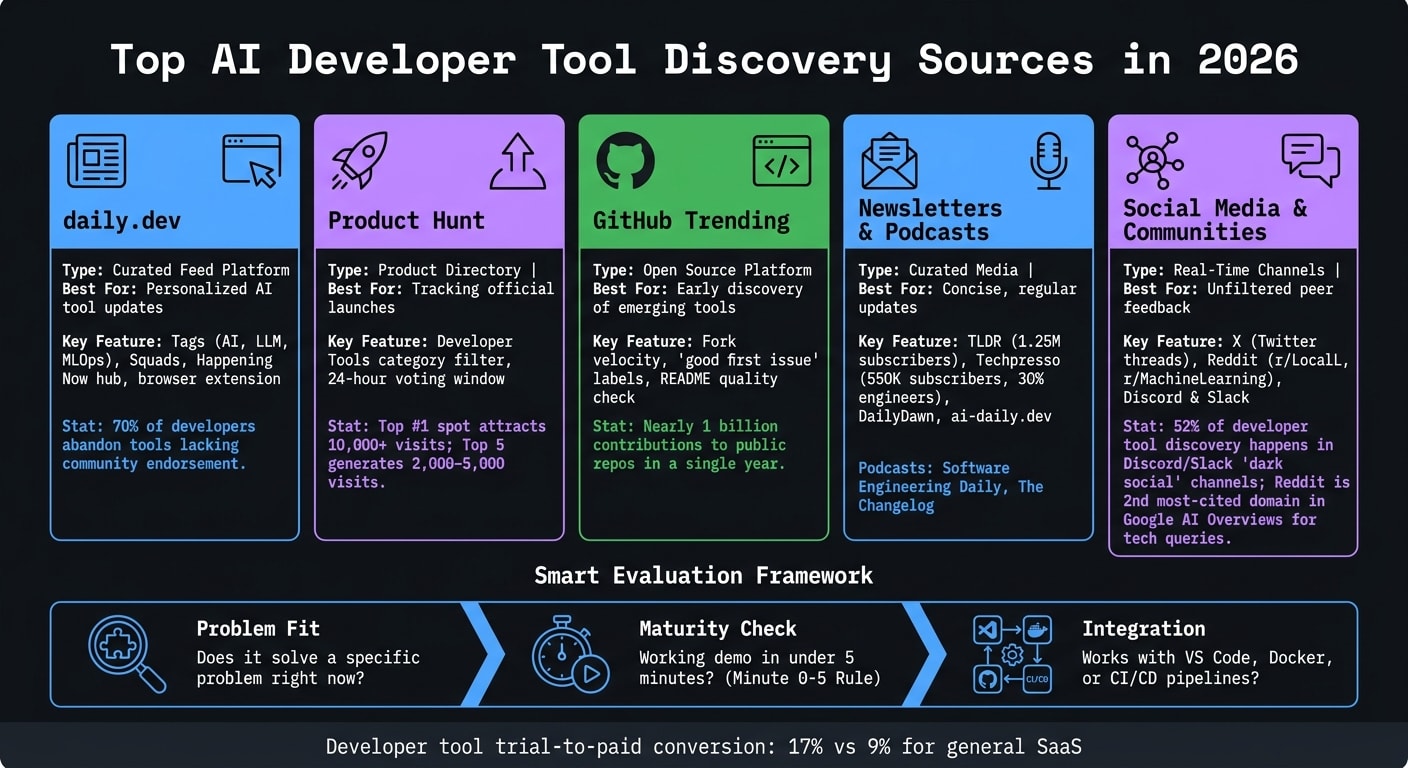
The flood of AI tools can feel overwhelming, but here’s the good news: you don’t need to chase every new release. Focus on structured discovery methods to find the best AI tools for developers that genuinely improve your workflow. Here are the top ways to stay informed and make smarter choices:
- daily.dev: A developer-focused platform that curates AI tool updates based on your interests. Use tags like AI, LLM, and MLOps to customize your feed. Engage with Squads for peer insights and community validation.
- Product Hunt: Track official launches in the Developer Tools category. Pair this with detailed reviews to separate hype from utility.
- GitHub Trending: Discover open-source AI tools early. Look for repositories with active contributions and clear documentation.
- Newsletters and Podcasts: Subscribe to sources like TLDR, Techpresso, and DailyDawn for concise updates. Podcasts like Software Engineering Daily dive deeper into tool discussions.
- Social Media and Communities: Platforms like X, Reddit, and Discord provide real-time feedback and practical advice from developers.
Key tip: Before adopting a tool, check if it solves a specific problem, offers quick onboarding, and integrates well with your current setup. Streamline your stack by keeping only tools that consistently deliver value.
This structured approach ensures you stay updated without wasting time or feeling overwhelmed.
daily.dev: The Go-To Place for Discovering AI Developer Tools
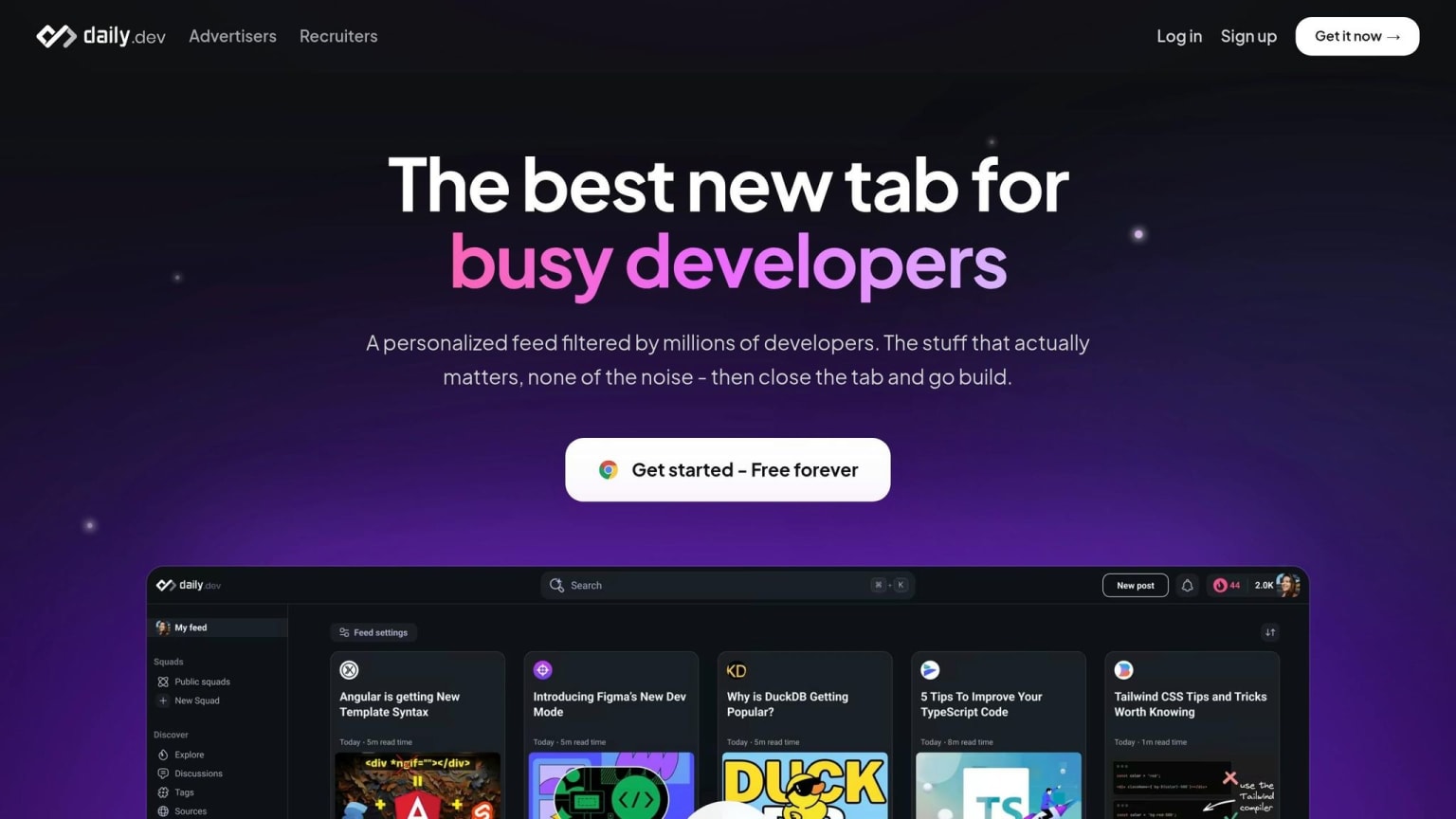
Keeping up with the rapid growth of AI tools can feel overwhelming, especially when general search engines struggle to deliver tailored results. That’s where daily.dev comes in. Designed specifically for developers, this free platform curates content based on your tech stack and interests. From articles and release notes to discussions, it ensures you get updates that truly matter to your work.
Setting Up AI-Focused Feeds and Tags
To make the most of daily.dev, start by following relevant tags. Popular options like AI, LLM, MLOps, and AI IDEs help filter your feed, ensuring you see content that aligns with your projects. These tags cut through the noise, surfacing tool announcements, integration guides, and benchmark comparisons tailored to your needs - not just trending topics for the broader developer community.
The "Happening Now" hub adds an extra layer of relevance. It organizes the day’s top stories into channel tabs, including a dedicated section for AI tools. Each story comes with an AI-generated TL;DR, giving you a quick overview so you can decide whether to dive deeper or move on.
Using Community Features to Get Tool Insights
Sometimes, the key to evaluating a tool is hearing how others are using it. That’s where Squads shine. These niche communities within daily.dev allow developers to share insights, ask questions, and compare tools. For instance, a detailed comparison of AI coding tools - Cursor, Windsurf, GitHub Copilot, and Base44 - was recently shared on daily.dev. The analysis rated Base44 highest, scoring it 92/100 for its user experience, deployment ease, and pricing . Insights like this are hard to find through a simple web search.
This peer-driven validation is crucial, especially when 70% of developers reportedly abandon tools that lack community endorsement . Squads provide that much-needed validation, making them an essential part of staying informed.
Building a Daily Routine Around daily.dev
Integrating daily.dev into your daily habits is simple. Install its browser extension so your feed opens with every new tab. Spend a few minutes each morning scanning the Happening Now channel for AI tools. Use the TL;DR summaries to quickly assess what’s worth exploring further. If a tool catches your eye, save it or dive into Squad discussions for deeper insights. This approach keeps your discovery process efficient and intentional.
"The 'post and share' model is over. What works instead: intentional communities where people actually help each other." - Prashant Sridharan, Developer Marketing Expert
With its personalized feed, real-time updates, and active community engagement, daily.dev doesn’t just help you find tools - it gives you the context to decide if they’re worth your time.
Using Product Directories and Open Source Platforms to Find More Tools
Expanding beyond your curated feed from daily.dev, product directories and open source platforms provide additional ways to discover and evaluate new AI tools.
Tracking New Tools on Product Directories
Product Hunt is a go-to platform for spotting official AI tool launches. Tools compete for visibility during a 24-hour voting window, and the stakes are high - a top 1 spot can attract over 10,000 visits, while landing in the top 5 typically generates 2,000–5,000 visits . For developers, filtering directly to the Developer Tools category is a smart way to bypass unrelated apps and focus on relevant tools.
However, directories often amplify launch-day excitement. A polished Product Hunt page doesn’t guarantee the tool’s reliability in real-world use. To separate hype from substance, check detailed reviews and uptime data. Pair this with daily.dev’s "Happening Now" channel, which provides AI-generated summaries of breaking news. This combo helps you quickly decide whether a tool is worth exploring further.
Finding Open Source AI Tools on GitHub
GitHub Trending is an excellent resource for discovering emerging AI tools before they hit mainstream attention. By mid-2026, AI agent skill repositories have dominated the trending page, reflecting a growing trend of developers building autonomous workflows . With nearly one billion contributions to public repositories in a single year , identifying the right signals is essential.
When evaluating a repository, fork velocity is a reliable indicator of active development. Another key signal is the "good first issue" label, which is a great way to start contributing to open source projects. Repositories that use this label often showcase strong community involvement and long-term viability . A great example is Highlight.io, which has earned nearly 9,000 GitHub stars by actively curating these labels and linking its public roadmap to GitHub issues .
"Minimize friction to retain developer engagement. If they can't see the value in 30 seconds, they are gone." - Jonathan Fishner, Co-founder, ChartDB
This advice applies perfectly to GitHub: if a repository’s README doesn’t clearly communicate its value in under 30 seconds - ideally with a one-sentence description and a demo GIF - it’s probably not worth your time yet. Quick evaluations on GitHub pair well with the fast insights from daily.dev, keeping your toolset sharp and efficient.
Once a tool passes these initial checks, validate it further by tapping into community discussions on daily.dev. These methods together provide a well-rounded approach to refining your AI tool discovery process.
Using Developer Media and Social Channels to Stay Informed
Pair your daily.dev habits with carefully chosen newsletters and active social media participation to stay ahead on AI tool updates.
Developer Newsletters and Podcasts to Check Out
Newsletters are a dependable way to get concise updates on AI tools. For example, the TLDR newsletter, with over 1.25 million subscribers, consistently highlights major AI tool launches alongside broader engineering news. If you're looking for something more focused, Techpresso caters to about 550,000 subscribers, 30% of whom are engineers, making it particularly relevant for developer-specific updates.
For indie developers, DailyDawn is a great pick. It uses a language model to sift through noise, surfacing open-source projects, trending GitHub repositories, and HuggingFace releases. You can subscribe via email or RSS. Similarly, ai-daily.dev summarizes the top 5–7 AI developer stories daily from over 20 sources. It’s available via RSS or as a weekly Slack bot rollup, making it a handy addition to any centralized RSS reader.
Podcasts like Software Engineering Daily and The Changelog dive deeper, offering insights and discussions on emerging AI tools from a builder's perspective.
Engaging on Social Media and in Developer Communities
Social media platforms are another rich source of up-to-date, practical insights. On X (formerly Twitter), developers often share technical threads tackling real-world challenges - like debugging flaky CI pipelines or optimizing LLM inference calls. These posts usually include code snippets and come directly from practitioners, not marketers.
Reddit has established itself as a valuable resource, now ranking as the second most-cited domain in Google AI Overviews for technical queries. Subreddits like r/LocalLLaMA and r/MachineLearning are especially helpful for discovering new AI tools. When assessing contributors, try the 90/10 rule: if 90% of their posts are genuine technical insights and only 10% are promotional, their recommendations are likely worth considering.
"Developers make buying decisions in Reddit threads - not on your landing page." - Egidijus, Founder, Prowlo
Platforms like Discord and Slack are also hotspots for unfiltered feedback. Research indicates that 52% of developer tool discovery happens in these "dark social" channels. Joining Discord servers and using top developer advocacy tools for tools you already use - like LangChain or other frameworks - lets you engage directly with developers troubleshooting in real time. This kind of interaction can quickly help you determine if a new AI tool is production-ready.
A Simple Framework for Deciding Which AI Tools to Try
With the flood of AI tools emerging across newsletters, social media, and community discussions, the real challenge isn't finding them - it's figuring out which ones actually make a difference. Once you've explored sources like daily.dev and product directories, use this framework to quickly evaluate and choose tools that genuinely improve your programming skills and workflow.
Filtering Tools by Problem Fit and Maturity
Start by asking yourself: Does this tool solve a specific problem I have right now? If it doesn't immediately address a workflow or challenge, move on. Once you've confirmed it fits, look for signs of maturity. For example, on GitHub, check if the tool has quick responses to issues and a clear public roadmap. These are good indicators of reliability and active development.
Another quick test is the "Minute 0-5" rule: Can you get a working demo or "Hello World" example within five minutes of visiting the tool's page? If not, that's a warning sign. The best tools, like Stripe and Twilio, consistently deliver value within this timeframe . If it takes over 15 minutes just to get started, the onboarding process could slow your team down significantly.
"Minimize friction to retain developer engagement. If they can't see the value in 30 seconds, they are gone." - Jonathan Fishner, Co-founder, ChartDB
Weighing Cost, Privacy, and Integration
Next, consider the tool's cost, privacy practices, and integration capabilities. Look for tools that offer a free tier or trial - serious tools often do because they know their value. Developer tools, for instance, have a trial-to-paid conversion rate of 17%, almost double that of general SaaS tools at 9% .
On privacy, keep in mind that more than half of developers use ad blockers , signaling a preference for tools that don't rely on intrusive tracking. Choose tools that are transparent about how they handle your data and code. For integration, ask whether the tool works seamlessly with your current setup - like supporting VS Code extensions, Docker, or CI/CD pipelines - rather than evaluating it as a standalone product .
"Technical honesty wins AI buyers. Name competitors, publish your losses alongside wins, link to real benchmarks." - Louis Corneloup, Founder, Dupple
These criteria help you make smarter decisions and avoid unnecessary additions to your workflow.
Keeping Your Tool Stack Small and Focused
"Tool fatigue" is a real problem, and the best way to avoid it is by being selective. Conduct quarterly reviews to ensure you're only keeping tools that consistently provide value. A lean, focused stack is far more effective than constantly chasing the next shiny release.
Stick to a handful of well-integrated tools that work together smoothly. When a new tool grabs your attention, run it through the fit-and-maturity filter first. Only add it if it's filling a genuine gap or replacing something less effective. By combining this disciplined approach with curated feeds like daily.dev, you can maintain a streamlined stack that keeps your workflow agile and productive.
Conclusion: Building a Smarter AI Tool Discovery Workflow in 2026
The number of AI developer tools keeps expanding, making it harder to keep up. Developers who thrive in this environment rely on a structured, repeatable discovery process instead of chasing every new release.
A solid approach involves three key stages: start with an AI-generated, need-specific list, refine it through community feedback, and confirm integration ease by reviewing documentation. As Karl Hughes of Draft.dev explains:
"Developer tool discovery has shifted to AI-powered search, requiring new optimization strategies: Topic-by-topic expertise now drives visibility."
This process works seamlessly with daily.dev, which simplifies each step. Use its personalized feed and "Happening Now" feature to stay focused, while Channel tabs help you dive into specific topics like AI tools or framework updates. The browser extension makes discovery effortless by turning every new tab into a chance to uncover relevant tools.
To complement this, rely on GitHub for technical validation, niche newsletters for curated insights, and community discussions to gain practical feedback. The aim isn’t to track every possible source but to create a lightweight system that filters out noise and highlights only the tools that truly matter. By combining these strategies, you can build an efficient workflow that consistently surfaces tools that genuinely enhance your development process.
FAQs
How do I set up daily.dev to only show AI tool updates I care about?
To stay updated on AI tools, set up your feed with the AI tag to easily access relevant content. Participate in community discussions by joining the AI squad, and use the Happening Now feature to keep up with real-time updates in the AI tools channel. For regular summaries, you can subscribe to the digest. If you're using a daily.dev Plus subscription, take advantage of advanced custom feeds to fine-tune your topic preferences.
What are the quickest signs an AI dev tool is mature and usable?
A well-developed AI tool for developers usually stands out with three important qualities:
- Clear, automated documentation: This includes runnable code samples that make understanding and implementing the tool straightforward.
- Community validation: Peer reviews on platforms like daily.dev and GitHub help establish trust and showcase real-world usability.
- Workflow integration: Features like sandboxes or free tiers make it easy to test and adopt the tool without jumping through hoops.
These traits ensure the tool is dependable, addresses practical needs, and is simple to evaluate.
How do I avoid tool fatigue while still keeping up with new AI tools?
To steer clear of tool fatigue, it's helpful to follow a structured approach when exploring new options. Platforms like daily.dev can help by delivering personalized feeds with updates that match your interests. Subscribing to curated digests is another great way to stay informed without being overwhelmed.
Leverage community-driven insights to cut through the noise and focus on tools that offer clear, automated documentation. Instead of aimlessly scrolling through generic lists of tools, try using problem-specific searches. This way, you can zero in on solutions that directly address your current technical challenges.