Side-by-side comparison of Cursor ($20/mo), VS Code with Copilot ($10/mo), and Windsurf ($15/mo)
In 2026, three AI code editors dominate the market: VS Code with GitHub Copilot, Cursor, and Windsurf. Each offers unique strengths depending on your workflow, project size, and budget:
- VS Code with GitHub Copilot ($10/month): Affordable, widely used, and integrates seamlessly with essential VS Code extensions. Best for teams already using GitHub workflows.
- Cursor ($20/month): Tailored for large-scale projects with advanced multi-file refactoring, a 200K token context window, and high code acceptance rates. Ideal for professional developers tackling complex codebases.
- Windsurf ($15/month): Focuses on autonomous coding with its Cascade agent, perfect for rapid prototyping and new projects. Offers a free tier with 25 credits/month.
Quick Comparison:
| Feature | VS Code (Copilot) | Cursor | Windsurf |
|---|---|---|---|
| Price (Pro) | $10/month | $20/month | $15/month |
| Best For | GitHub workflows | Large projects | Prototyping |
| Context Window | Repo-level | 200K tokens | 100K tokens |
| Multi-file Editing | Limited | Excellent | Good |
| Agent Autonomy | Moderate | High | Very High |
| Free Tier | Yes | Trial (2 weeks) | Yes (25 credits) |
Each tool excels in different areas. Choose VS Code for cost-efficiency, Cursor for precision on complex projects, and Windsurf for autonomous coding and prototyping. Let’s explore their details to help you make the best choice.
How AI Code Editors Have Changed
AI in Development Tools
Back in 2001, IntelliSense introduced the idea of AI in coding tools, offering basic code suggestions. Fast forward to now, and these tools have transformed dramatically. Deep learning models like Intellicode and GitHub Copilot’s Codex have paved the way for smarter, more intuitive systems. By 2023, technologies like Fill-in-the-Middle (FIM) enabled AI to understand not just what comes before your cursor but also what follows, creating a more seamless coding experience . By 2026, context windows expanded to handle vast amounts of data - ranging from 200,000 tokens to even 1 million with tools like Supermaven and Gemini . This means AI can now analyze entire systems, including microservice architectures, database schemas, and internal libraries, all at once.
Today’s AI editors go beyond code suggestions. They can now plan tasks, execute terminal commands, run tests, and debug multi-file projects automatically . These advancements have led to widespread adoption: as of early 2026, 92% of developers use AI-powered coding tools, and 51% of all code committed to GitHub is either generated or heavily assisted by AI . The market for AI coding tools has also exploded, reaching $12.8 billion in 2026, compared to $5.1 billion just two years earlier .
"Today coding is practically solved... We're going to start to see the title of software engineer go away. It's just going to be 'builder' or 'product manager.'" – Boris Cherny, Creator of Claude Code, Anthropic
However, these tools aren’t without flaws. While they slash time spent on repetitive coding tasks by 46% on average , they also introduce new risks. A 2026 study found that 14.3% of AI-generated code snippets contained security vulnerabilities, compared to 9.1% in human-written code . Additionally, over 90% of "code smells" - subtle flaws that make maintenance harder - were found in AI-generated code .
These advancements have shaped the rise of today’s top AI code editors.
The 3 Main Editors in 2026
VS Code with GitHub Copilot remains the most widely used option. At $10/month for the Pro version, it’s also the most affordable. Its versatility is a major draw, working as an extension across multiple IDEs like VS Code, JetBrains, Visual Studio, and even Neovim . Microsoft and Google report that 25% of their new code is now generated using tools like Copilot . While it’s reliable and backed by Microsoft’s infrastructure, it lacks advanced features like deep multi-file refactoring, which limits its appeal for more complex projects.
Cursor, a specialized fork of VS Code, has gained traction for its AI-first design. By 2026, it reached a staggering $29.3 billion valuation . Its standout feature, "Composer" mode, excels at multi-file refactoring and indexing large codebases. This results in an impressive code completion acceptance rate of 72%, compared to GitHub Copilot’s 65% . Priced at $20/month, Cursor is the preferred choice for developers working on large-scale, professional projects.
Windsurf, developed by Codeium, focuses on autonomous coding with its "Cascade" agent . For $15/month, it offers rapid prototyping capabilities, such as scaffolding a full CRUD API in just 5 minutes - something that would typically take 2 hours manually . Windsurf’s Riptide indexing can process millions of lines of code and simplifies context retrieval, making it ideal for large monorepos. However, its credit-based system can be tricky for newcomers to navigate .
Next, we’ll break down how these editors compare in terms of features and performance.
We Tier Ranked Every AI Coding Assistant
VS Code vs Cursor vs Windsurf: Feature Breakdown
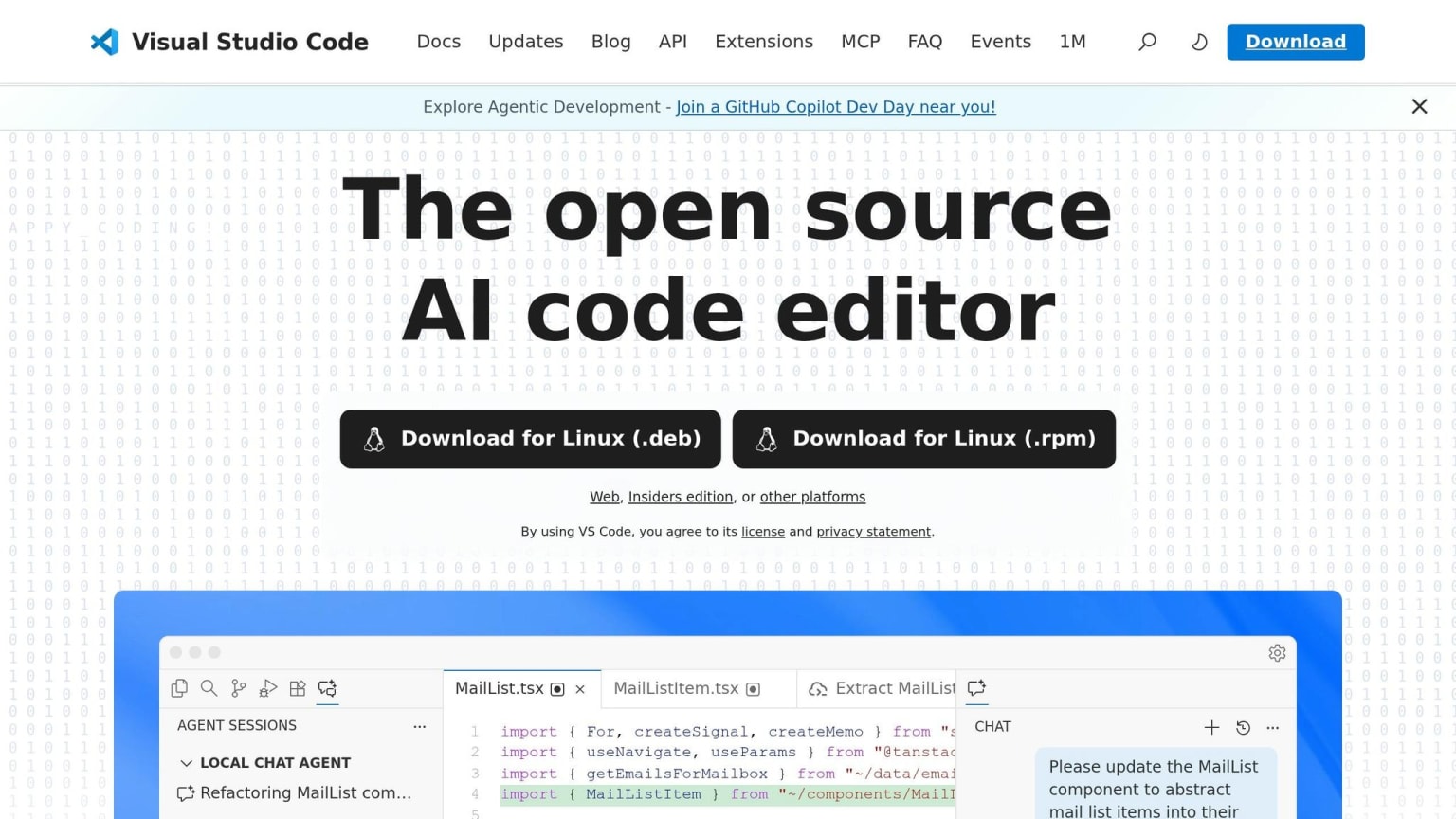
In this comparison, we dive into the key features and limitations of three popular AI-powered code editors: VS Code with Copilot, Cursor, and Windsurf. This sets the foundation for our upcoming performance tests and privacy analysis.
VS Code with Copilot
VS Code, paired with GitHub Copilot, dominates the AI code editor market with a 42% share and is the choice of 90% of Fortune 100 companies . At $10/month for the Pro tier, it’s the most budget-friendly option and integrates seamlessly with major IDEs like JetBrains, Visual Studio, and Neovim. Its standout feature is its tight integration with GitHub's ecosystem, from Issues to Pull Requests, making it a go-to for teams already embedded in GitHub workflows . Impressively, Copilot generates 46% of the code written by its users, with Java developers reaching even higher at 61% .
"GitHub Copilot remains the safe choice for organizations prioritizing compliance, security audits, and seamless GitHub integration." - Browse AI Tools
However, Copilot has its limitations. Its Agent mode handles basic multi-file tasks but lacks the precision and flexibility of AI-first editors when it comes to advanced refactoring. For organizations needing enterprise-level security and IP indemnity, VS Code with Copilot is a dependable choice. That said, Cursor takes multi-file refactoring to another level, as we’ll explore next.
Cursor
Cursor, an AI-native fork of VS Code, is tailored for professional developers managing large-scale projects. Its standout feature, Composer, enables accurate multi-file refactoring across more than 10 files. Using semantic indexing, Cursor maintains full awareness of the codebase, boasting a 200K token context window - twice the capacity of Windsurf’s Ultimate tier . This results in a 72% code completion acceptance rate, the highest among the three editors . For TypeScript projects, Cursor outshines its competitors, suggesting correct property names 85% of the time compared to Windsurf’s 78% .
"Cursor is the better all-around AI code editor in 2026. Its autocomplete is in a class by itself, its codebase understanding is more reliable, and its editing workflow gives you the control you need." - DevTools Review
Priced at $20/month for the Pro tier, Cursor is estimated to save developers an average of 47 minutes daily through its advanced refactoring tools. However, it’s only available as a standalone app, which might be a drawback for those who prefer extensions within other IDEs. For developers managing large, established codebases and requiring precise control, Cursor is a compelling choice. Still, Windsurf’s autonomous features offer a different kind of advantage, as we’ll see next.
Windsurf
Windsurf, created by Codeium, takes a more autonomous approach with its Cascade agent. Cascade can plan tasks, run terminal commands, execute tests, and iterate until successful - making it ideal for rapid prototyping . Its Riptide indexing allows it to handle millions of lines of code, making it particularly effective for large monorepos. At $15/month for the Pro tier, Windsurf also offers a free tier with 25 credits per month for casual users . With a code completion acceptance rate of 65%, it’s competitive, though slightly behind Cursor .
"Windsurf is the best free AI code editor in 2026. It's nearly as good as Cursor for half the price." - Jim Liu, Full-stack Developer
While Cascade excels at making smaller, focused changes (up to 5 files), it struggles with larger-scale refactoring tasks. Additionally, some users have reported performance issues, with CPU usage spiking to 70–90% during extended agent runs. Despite these drawbacks, Windsurf is an excellent option for developers working on new projects or those on a tight budget, offering impressive features at a reasonable price point.
Feature Comparison Table
Building on our feature breakdown, the table below provides a clear side-by-side comparison of how each editor performs across critical attributes like autocomplete speed, context handling, and pricing.
Complete Feature Matrix
| Feature | Cursor | Windsurf | GitHub Copilot |
|---|---|---|---|
| Autocomplete Model | Cursor Tab (Proprietary) | Supercomplete (SWE-1-mini) | Multi-model (GPT-5, Claude 4.5) |
| Acceptance Rate | 72% | 65% | 65% |
| Autocomplete Latency | <200ms | <150ms | ~300ms |
| Context Window | 200K tokens | 100K tokens | Repository-level metadata |
| Multi-file Editing | Excellent (Composer) | Good (Cascade) | Limited (Agent Mode) |
| Agent Autonomy | High (steered) | Very High (fire-and-forget) | Moderate (task-based) |
| AI Chat Interface | Cmd+L (multi-model) | Cascade AI (collaborative) | Integrated chat (multi-model) |
| IDE Support | VS Code fork only | VS Code, JetBrains | VS Code, JetBrains, VS, CLI, Mobile |
| BYOK Support | No | Yes (Claude models) | No |
| Privacy Mode | Yes (local indexing) | Yes (Enterprise VPC) | Yes (IP indemnity) |
| Free Tier | 2-week trial | 25 credits/mo | 2,000 completions/mo |
| Pro Pricing | $20/mo | $15/mo | $10/mo |
| Business/Teams | $40/user/mo | $30/user/mo | $19/user/mo |
| Time Saved Daily | 47 minutes | 38 minutes | 29 minutes |
| Market Share | 18% | Growing | 42% |
| G2 Rating | 4.7/5 | 4.4/5 | 4.6/5 |
The table emphasizes Cursor's standout features like a 72% acceptance rate and a 200K token context window - perfect for handling large-scale projects. Windsurf leads with the fastest autocomplete latency (<150ms) and offers flexibility through its bring-your-own-key feature. Meanwhile, GitHub Copilot shines with its affordability at $10/month and extensive IDE compatibility, including mobile and CLI options. With these distinctions laid out, the next step is evaluating how each performs on real coding tasks in production settings.
Performance Tests with Real Coding Tasks
We put each editor through its paces using real-world coding tasks to measure their practical performance. These benchmarks reveal where each tool shines and where it encounters obstacles.
Benchmark Results
In February 2026, OpenAIToolsHub created a Next.js dashboard featuring authentication, Prisma, and Tailwind. The project spanned 40 files and 3,000 lines of code. Cursor achieved a 72% completion acceptance rate and successfully refactored class components into hooks across 8 files without breaking any tests. On the other hand, Windsurf struggled with tasks involving changes across more than 5 files . These results highlight the strengths and limitations of each tool in handling complex projects.
For autonomous task execution, DevTools Review tested implementing Redis-based rate limiting across all public API routes. Windsurf's Cascade agent completed the task in just 3.5 minutes, managing to read the architecture, generate middleware, update environment variables, and write five integration tests . While Windsurf excelled in automation speed, Cursor stood out for its detailed and accurate refactoring capabilities, showcasing distinct strengths for different use cases.
"Cursor's tab-based autocomplete remains the single most impressive feature in any AI coding tool. It doesn't just complete the line you're typing - it predicts entire function bodies." - DevTools Review
When it came to TypeScript refactoring, Cursor converted a 15-file React component library from JavaScript to TypeScript in under 10 minutes, handling imports, prop types, and tsconfig.json updates with precision . GitHub Copilot tackled similar tasks but required significantly more manual intervention due to its limited ability to edit multiple files simultaneously compared to Cursor's Composer mode .
In terms of time savings, Cursor users reported saving 47 minutes daily, Windsurf users saved 38 minutes, and GitHub Copilot users saved 29 minutes . Cursor also led to a 70% reduction in pull request review comments and a 35% decrease in TypeScript errors when using .cursorrules to enforce project standards . These findings underscore Cursor's effectiveness in streamlining workflows and reducing errors, setting the stage for further evaluation of its impact on security and overall utility.
Privacy and Where Your Code Goes
Your code is sent to AI systems for processing, and understanding how and where it's handled is crucial - especially for proprietary or regulated projects. Here's a breakdown of how different editors manage data processing, privacy settings, and compliance.
Data Processing Comparison
VS Code with GitHub Copilot processes code snippets using Microsoft-hosted cloud models. For $19 per user per month, the Business tier includes IP indemnity, which offers protection against copyright issues. The Enterprise tier, priced at $39 per user per month, adds SOC 2 compliance and audit logs, making it a strong option for regulated industries .
Cursor, on the other hand, creates a local index of your project for context while still sending code snippets to cloud APIs like OpenAI and Anthropic. However, Cursor introduces a "Privacy Mode" feature that disables telemetry storage. As AI:PRODUCTIVITY explains:
"Your code snippets still go to AI APIs (OpenAI, Anthropic) but Cursor doesn't store them" .
The Business tier, at $40 per user per month, includes this privacy toggle along with features like single sign-on (SSO) and team management .
Windsurf provides even more flexibility with its privacy options. While standard tiers process code through cloud models, the Enterprise tier allows for VPC and on-premises deployment, enabling you to run models on your own infrastructure. Windsurf also supports "Bring Your Own Key" (BYOK), allowing you to use your own Anthropic API key, giving you greater control over where your code is sent.
For organizations handling sensitive or proprietary code, it's essential to carefully review each vendor's data processing policies. All three editors transmit code to cloud-hosted models unless enterprise or local configurations are applied. For stricter data security, the Business or Enterprise tiers with SOC 2 compliance and advanced privacy options are worth considering .
| Feature | VS Code (Copilot) | Cursor | Windsurf |
|---|---|---|---|
| Processing Location | Cloud-based | Cloud + Local Indexing | Cloud/Local Hybrid (Enterprise) |
| Privacy Controls | Content exclusion (Business+) | Privacy Mode toggle | BYOK + VPC/On-prem options |
| Data Storage | Isolated in Enterprise | Not stored in Privacy Mode | Local/VPC storage available |
| Compliance | SOC 2, IP Indemnity | SOC 2 (Business) | Enterprise VPC/On-prem |
| Deployment Options | Cloud-only | Cloud-only | Hybrid (Enterprise) |
Which Editor Should You Choose?
Choosing the right AI code editor depends on your work style, the complexity of your projects, and your team's needs. A well-matched editor can boost productivity and help manage costs. Based on feature and benchmark analysis, here are targeted recommendations that align each editor's strengths with specific developer profiles.
Recommendations by Developer Type
Each editor shines in different scenarios, as highlighted in earlier performance and privacy reviews.
For solo developers tackling complex codebases, Cursor stands out. With its 200K token context window and Composer mode, it simplifies multi-file refactoring, saving an average of 47 minutes daily. It also boasts a high code acceptance rate. Jim Liu, a full-stack developer, highlights the value:
"If you code 20+ hours per week and your time is worth $50/hour, the extra $10/month [for Cursor] pays for itself in the first day" .
For enterprise teams already integrated with GitHub, GitHub Copilot is a natural choice. Trusted by 90% of Fortune 100 companies , it offers features like IP indemnity and SOC 2 compliance at its Business tier. At $19 per user per month, it works seamlessly across platforms like VS Code, JetBrains, Visual Studio, and Neovim. As AI Coding Flow puts it:
"Copilot still wins on ubiquity and low friction" .
For developers focused on rapid prototyping or working with limited budgets, Windsurf provides great value. Its free tier includes 25 credits per month and unlimited inline completions , making it accessible without any upfront costs. Windsurf's Cascade agent can autonomously scaffold entire features, and the Pro plan, priced at $15 per month, is 25% cheaper than Cursor. Developer feedback suggests Windsurf delivers comparable performance to Cursor at a lower cost .
For teams prioritizing strict privacy controls, Windsurf's Enterprise tier supports VPC and on-premises deployment, enabling teams to run models on their own infrastructure .
Pricing Breakdown
Here’s a comparison of pricing tiers as of March 2026, helping to clarify which plan aligns with your needs:
| Plan Tier | Cursor | Windsurf | GitHub Copilot |
|---|---|---|---|
| Free Tier | Limited (2-week Pro trial) | $0 (25 credits/mo + unlimited inline) | $0 (2,000 completions + 50 requests/mo) |
| Individual Pro | $20/mo (500 fast requests) | $15/mo (500 credits) | $10/mo (unlimited completions) |
| Power User | $60/mo (Pro+) or $200/mo (Ultra) | $22/mo (Ultimate with Claude Opus) | $39/mo (Pro+ with agent features) |
| Team/Business | $40/user/mo (SSO, admin tools) | $30/user/mo (admin dashboard) | $19/user/mo (IP indemnity, SOC 2) |
| Enterprise | Custom pricing | $60/user/mo (VPC/on-prem) | $39/user/mo (audit logs, compliance) |
For individual developers, Cursor's $20/month Pro plan offers an estimated $470 in monthly value at a $60/hour rate . Budget-conscious teams might prefer Windsurf Pro at $15/month or GitHub Copilot at $10/month, which deliver 80–85% of Cursor's capabilities . This pricing breakdown reflects the trade-offs between cost, features, and security outlined above.
What's Coming Next for AI Code Editors
The age of AI-powered code editors is taking a huge leap forward. Soon, these editors won’t just assist with code - they’ll handle entire workflows, from planning to deployment.
Background agents are one of the upcoming highlights. Cursor is rolling out tools like Bug Bot, where you can assign tasks and later review the completed diffs . Meanwhile, GitHub Copilot Workspace is already testing issue-to-PR pipelines - a feature that automatically transforms a GitHub issue into a proposed code change and pull request .
Automation isn’t the only area seeing advancements. Team collaboration tools are evolving quickly. Shopify, for instance, reported a 33% boost in merged PRs per developer after switching to AI-driven stacked PR workflows in 2025. This change reduced their median merge time from 24 hours to just 90 minutes . Similarly, Asana engineers saved 7 hours per week and shipped 21% more code by using AI-enhanced review tools . Future updates will likely include governance features like agent trust scoring, auto-merge rules for AI-generated PRs, and detailed tracking systems to identify which agent created specific pieces of code .
Another exciting shift is multi-model routing, which will soon become a standard feature. This means editors will automatically pick the best AI model for the task at hand. For example, they might use Claude 4.5 for reasoning, GPT-5 for logical tasks, or specialized code models depending on the requirements . This approach ensures faster and more accurate results without requiring you to manually choose models.
Context windows are also expanding. Cursor already supports up to 200K tokens, but future editors will go even further. This will allow AI to process not just your code but also deployment configurations, database schemas, and documentation all at once . With this comprehensive understanding, AI can trace bugs across microservices, coordinate large-scale refactors, and maintain consistent types and imports across dozens of files.
These advancements build on the privacy and performance strengths discussed earlier, setting the stage for a more seamless and integrated AI coding experience. As these features roll out, the differences between editors will continue to shape their individual strengths and appeal.
Conclusion
Choosing the right editor depends on your coding style and what you value most in your development workflow. Each tool brings something different to the table, catering to various needs in AI-driven development.
VS Code with Copilot stands out for its massive ecosystem and affordability at just $10/month. With over 50,000 extensions and a commanding 70% market share, it’s a great fit for developers looking to integrate AI tools into established workflows, especially in enterprise settings.
For those who want more precision and control, Cursor is a solid option. Priced at $20/month, it shines in multi-file refactoring with an impressive 72% acceptance rate and a 200K token context window. These features make it particularly appealing to professional developers tackling complex codebases.
If autonomous coding and rapid prototyping are your priorities, Windsurf might be the way to go. At $15/month, it offers the Cascade agent for efficient prototyping and includes a free tier with 25 monthly credits. This makes it a practical choice for greenfield projects and large monorepos. As noted by DevTools Review:
"Cursor is the better choice for most professional developers in 2026... Windsurf is the better choice for rapid prototyping and solo builders."
Ultimately, your decision should align with your workflow and priorities - whether that’s ecosystem integration (VS Code), refined control (Cursor), or autonomous functionality (Windsurf). As AI continues to shape the future of development, choosing the right tools ensures you stay ahead in this evolving landscape.
FAQs
Which editor is best for large codebases?
In 2026, Cursor stands out as a top choice for working with large codebases. Thanks to its advanced indexing, multi-file editing capabilities, and precise refactoring tools, it’s perfectly suited for managing extensive projects involving 50 or more files. While Windsurf is tailored more toward smaller or prototype projects, Cursor shines in handling complex, large-scale development. Features like its highly accurate autocomplete and in-depth understanding of intricate codebases make it a go-to tool for developers tackling major projects.
Which one is best for rapid prototyping?
In 2026, Windsurf stands out as the go-to tool for rapid prototyping, thanks to its emphasis on autonomous coding and speed. It’s designed to handle end-to-end tasks with very little manual input, making it perfect for greenfield projects and fast-paced iterations. Plus, its free tier makes it a great option for learning or working on side projects.
On the other hand, Cursor shines when it comes to managing large, complex codebases. This makes it a better fit for ongoing professional development rather than quick prototyping needs.
How can I keep my code private with these tools?
When using AI code editors like Cursor, Windsurf, or Windsurf/Codeium, it's essential to understand how and where your code is processed. For example, Windsurf prioritizes local or private processing, offering privacy safeguards that can help maintain confidentiality. On the other hand, Cursor provides less clarity about its privacy measures.
To ensure your code stays secure, always take the time to review the privacy policies and settings of these tools. This will help you verify that their practices align with your security and privacy requirements.