

Refine searches with AND/OR/NOT, quotes, and site/file modifiers to find qualified software developers on LinkedIn, GitHub, and Google.
Struggling to find qualified software developers using various sourcing channels? Boolean search can help. By using logical operators like AND, OR, and NOT, you can refine your search results on platforms like LinkedIn, Google, and GitHub to find candidates with the exact skills and experience you need.
Here’s how it works:
- AND: Combines multiple criteria (e.g.,
Python AND Django). - OR: Broadens results by including synonyms or variations (e.g.,
(React OR Angular OR Vue)). - NOT: Excludes irrelevant terms (e.g.,
Java NOT JavaScript).
You can also use advanced techniques like quotation marks for exact phrases ("software engineer"), parentheses for grouping, and platform-specific modifiers like site:github.com or filetype:pdf.
Boolean search saves time by narrowing thousands of profiles down to a targeted list. Mastering it can transform how you recruit developers.
Basic Boolean Operators for Developer Searches
::: @figure 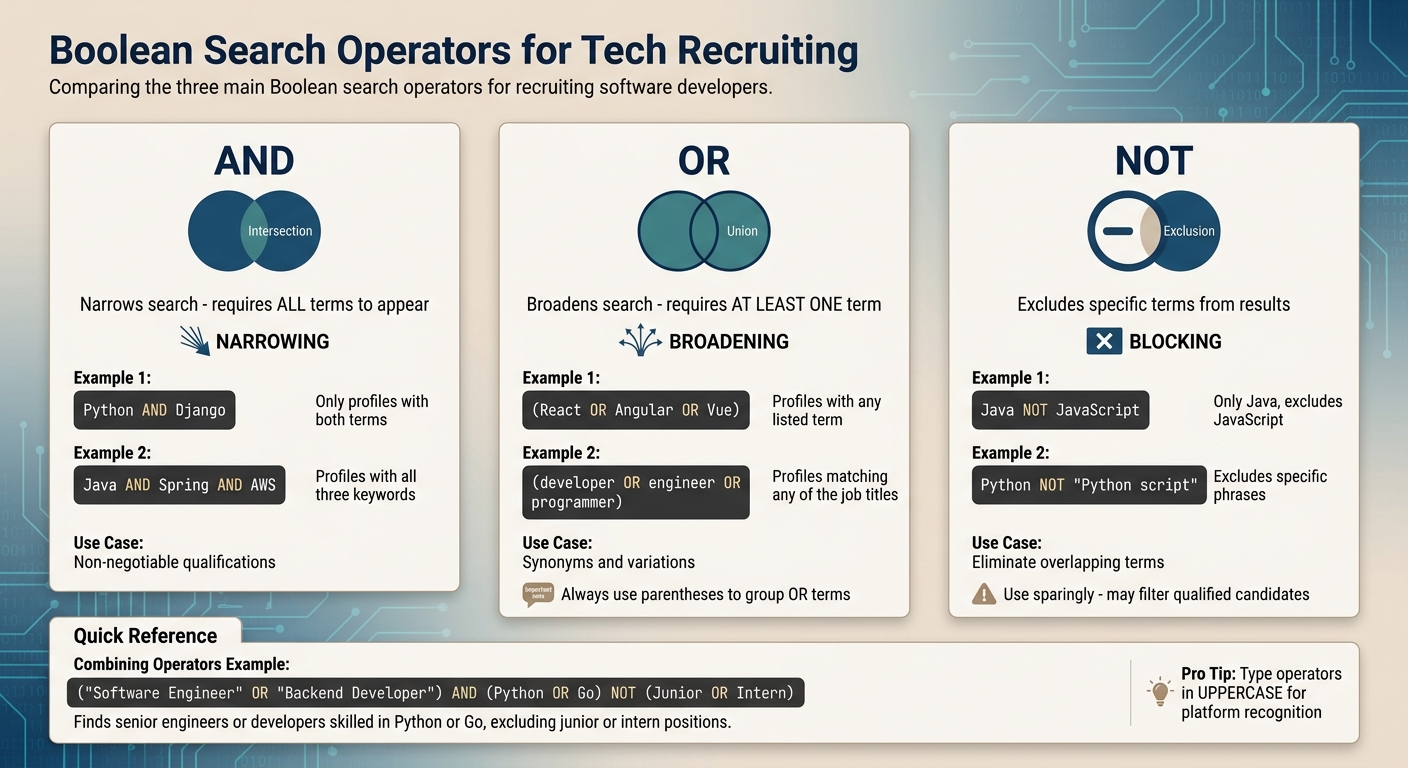 {Boolean Search Operators Guide for Developer Recruiting}
Boolean search revolves around three main operators: AND, OR, and NOT. These tools help you refine searches to pinpoint developers with the exact skills and experience you need using a developer hiring checklist.
Using AND
The AND operator ensures that all specified terms appear in the results. For instance, searching Python AND Django will only return profiles that include both terms. This is ideal when you're looking for candidates with specific, non-negotiable qualifications, such as programming languages, frameworks, or certifications.
AND narrows your search by requiring all terms to appear in results. For example, searching
recruiter AND Pythonwill only show profiles or documents that include both terms.
A good approach is to start broadly and then layer in additional AND terms. For example, you might search Java AND Spring AND AWS to see how each added requirement affects the candidate pool. Remember to type AND in all caps for platforms to recognize it correctly.
Once you've narrowed your search, the OR operator can help you broaden it strategically.
Using OR
The OR operator broadens your search by including profiles that contain any of the listed terms. This is particularly helpful when candidates may use different terminology to describe similar roles or skills. For example, (developer OR engineer OR programmer) captures multiple job title variations, while (React OR Angular OR Vue) identifies frontend developers regardless of their preferred framework.
Always use parentheses to group OR terms. For example, (software OR engineer OR developer) AND Python ensures the search engine processes the OR group correctly. Without parentheses, a query like software engineer OR developer Python may return unrelated results, such as profiles with only "Python" mentioned.
When you need to exclude certain terms, the NOT operator comes into play.
Using NOT
The NOT operator removes specific terms from your search results. This is particularly useful when similar technologies or terms overlap. For instance, Java NOT JavaScript focuses on Java developers without including JavaScript-related profiles. Similarly, Python NOT "Python script" helps distinguish between Python developers and those who merely mention scripting.
You can also use NOT to eliminate irrelevant results. For example, adding -job -jobs -sample -examples to a Google search can help you avoid job boards or resume templates. On Google, the minus sign (-) works as a shortcut for NOT. Just place it directly before the word you want to exclude, without a space (e.g., Java -intern).
However, use NOT sparingly. Overusing exclusions can unintentionally filter out qualified candidates, especially those who might have held certain titles earlier in their careers .
| Operator | Function | Example |
|---|---|---|
| AND | Requires all terms to be present | Python AND Django |
| OR | Requires at least one term to be present | (C++ OR C#) |
| NOT | Excludes profiles containing specific words | Java NOT JavaScript |
sbb-itb-d1e6221
Advanced Boolean Search Techniques
Once you’ve nailed the basics of Boolean search, it’s time to level up. Advanced techniques allow you to refine your searches, making it easier to zero in on the right developer profiles. These methods help you cut through the noise and focus on candidates who match your criteria.
Exact Phrases and Parentheses
Quotation marks are your go-to tool for searching exact phrases. For instance, searching for software engineer without quotes might return profiles where "software" and "engineer" appear separately. But when you use quotes - "software engineer" - you’ll only see results with that precise phrase. This is especially helpful for roles like "data scientist", "full-stack developer", or "backend engineer".
Parentheses are equally important when you’re combining multiple OR statements. For example:
("software engineer" OR "software developer") AND (Python OR Java)
Here, parentheses ensure the search engine processes your query in the right order, grouping related terms together.
"Parentheses - sometimes called brackets - are crucial to Boolean recruiting because they let the database know your order of operations." - SeekOut
On LinkedIn, the processing order for Boolean searches is: Quotes → Parentheses → NOT → AND → OR. If your search isn’t working as expected, simplify it. Start with one keyword and gradually add operators to identify where the logic might be breaking down.
Wildcard and Proximity Operators
The asterisk (*) is a wildcard operator that matches word variations, but its functionality depends on the platform. For example, LinkedIn doesn’t support wildcard stemming, so you’ll need to manually list variations like (recruiter OR recruiting). On Google, the asterisk works as a placeholder in phrases, such as "software * engineer", which can match titles with extra terms in between.
For more advanced phrase matching, Google X-ray searches are a powerful tool. These operators make it easier to locate candidates, saving you time and effort.
Search Modifiers for Developer Profiles
Search modifiers allow you to focus on specific platforms, file types, or sections of a webpage. For example, the SITE: modifier narrows your search to a particular domain. Try these examples:
site:github.com "data engineer"to find GitHub profilessite:stackoverflow.com/usersto locate active contributors on Stack Overflow
The INTITLE: modifier is another handy tool. It searches for keywords in page titles. For example: intitle:resume "full stack developer" can help you find resumes directly.
You can also use FILETYPE: to filter by document type. A query like filetype:pdf "software engineer" Java can lead you to downloadable resumes, often with contact details included.
If you’re searching on GitHub, take advantage of its internal qualifiers. For example:
- language: targets users who code in specific programming languages, like
language:TypeScript. - followers: filters by community influence, such as
followers:>50to find developers with a strong peer following.
Combine these with exclusion modifiers to clean up your results. For instance, adding -job -jobs -sample -examples can help eliminate job postings or sample templates.
| Modifier | Purpose | Developer-Specific Example |
|---|---|---|
| SITE: | Limits search to a specific domain | site:github.com "joined on" "Python" |
| INTITLE: | Finds keywords in the page title | intitle:resume "full stack developer" |
| FILETYPE: | Filters by file extensions | filetype:pdf "software engineer" Java |
| language: | Finds users coding in a specific language | language:TypeScript |
| followers: | Targets developers with community authority | followers:>100 |
These tools and techniques can help you fine-tune your search strategy, making your recruiting process more efficient and effective.
Boolean Search by Platform
Each platform has its own set of rules for Boolean search. Knowing these differences can save time and make your searches more precise, especially when sourcing developers.
LinkedIn Boolean Search
LinkedIn supports basic operators like AND, OR, NOT, along with quotation marks and parentheses. Operators must always be in UPPERCASE. If you leave a space between keywords, LinkedIn treats it as an implicit AND (e.g., "Java Python" is the same as "Java AND Python"). However, LinkedIn doesn't support wildcards (like develop*) or proximity operators such as NEAR.
Here’s a simple four-step method to structure your search:
- Step 1: List target job titles with OR (e.g.,
"Software Engineer" OR "Backend Developer"). - Step 2: Add required skills using AND (e.g.,
AND (Python OR Go)). - Step 3: Exclude irrelevant roles with NOT (e.g.,
NOT (Junior OR Intern)). - Step 4: Combine everything into one Boolean string.
For example:("Software Engineer" OR "Backend Developer") AND (Python OR Go) NOT (Junior OR Intern)
Keep in mind that LinkedIn Recruiter has a character limit of about 2,000, while the free version caps at around 1,000 characters . If your search isn’t working, start small with a few keywords, then add operators step-by-step to find where the issue lies.
If you hit LinkedIn's limits, you can use Google for an X-ray search. Use the operator site:linkedin.com/in to find public profiles without relying on LinkedIn's internal search.
Next, let’s look at how GitHub allows for even more tailored searches.
GitHub Boolean Search

GitHub offers unique search qualifiers that go beyond simple keyword matching, making it easier to find active developers. For example, the language: qualifier filters profiles based on actual coding activity rather than self-reported skills. Searching for language:TypeScript will show developers actively writing in TypeScript.
You can mix these qualifiers for more refined searches. For instance:language:Python location:"San Francisco" targets Python developers in San Francisco.
Other useful qualifiers include:
followers:: Find influential developers (e.g.,followers:>50).repos:: Filter by repository count (e.g.,repos:>10).- Exclusions: Use a hyphen to exclude terms (e.g.,
-language:javascript). - Range queries: Use two dots for ranges (e.g.,
stars:10..50orcreated:>2024-01-01).
Beyond profile searches, check the Contributors list on popular open-source projects to find developers with proven skills. You can also use the symbol: qualifier to identify those who’ve written complex classes or methods - an indicator of seniority.
Interestingly, over 1.3 million U.S.-based GitHub profiles include contact details from public commit histories, and personalized outreach here often results in response rates between 25% and 40% .
Now, let’s move on to how Boolean search works on job boards.
Job Board Boolean Search
Platforms like Indeed and Monster support basic operators such as AND, OR, and NOT, but handling parentheses can vary between sites. Always capitalize operators, as many job boards are case-sensitive.
- Use quotes for exact phrases (e.g.,
"Senior Software Engineer"). - Parentheses help group multiple OR statements with AND (e.g.,
(Java OR Python) AND "Spring Boot"). - To refine results, exclude irrelevant terms with modifiers like
-job,-jobs, or-examples.
For location-based searches, some job boards allow zip code ranges (e.g., Massachusetts 02108..02495). Additionally, advanced search fields on these platforms often simplify the process, reducing the chance of syntax errors.
Start with a basic query and build it step-by-step. For example, to capture different job title variations, try:("UX Designer" OR "Product Designer" OR "UI/UX Specialist").
How to Improve Your Boolean Search Results
Refining your Boolean strings is a key step in sharpening your candidate search, especially when paired with sourcing strategies that work across different platforms.
Combining Multiple Operators
The real power of Boolean search lies in combining multiple operators. For instance, a basic search like software engineer Python San Francisco might yield 47,000 results, but a well-constructed Boolean string can narrow that down to around 200 highly relevant profiles . Using AND, OR, NOT, and parentheses allows you to strike a balance between broadening your scope and pinpointing precise matches.
Start with OR to cover synonyms or similar terms. For example, ("Senior Full-Stack Developer" OR "Senior Software Engineer") ensures you don't miss variations of the role. Then, add AND to include must-have skills or qualifications, such as AND (React OR React.js) AND (Node OR Node.js). Finally, apply NOT to filter out irrelevant profiles, like NOT (Junior OR Intern OR Lead). Parentheses are crucial for grouping terms, ensuring the logic of your search remains intact.
"Boolean search is the single skill that separates recruiters who find candidates from recruiters who wait for them to apply."
- Careery Team
Here’s how a simple search can evolve into a more advanced string:
| Recruiting Goal | Simple Search String | Advanced Search String |
|---|---|---|
| Find a senior full-stack developer in Austin with React and Node.js experience | "Senior Full-Stack Developer" AND React AND Node.js AND "Austin" |
("Senior Full-Stack Developer" OR "Senior Software Engineer") AND (React OR React.js) AND (Node OR Node.js) AND (Austin OR ATX) |
Always double-check that your parentheses are balanced - an unbalanced string can silently fail and lead to missed results.
Testing and Adjusting Your Searches
Refining a Boolean string is an iterative process. Start small, focusing on a core skill or title with just one or two keywords. Review the first 50–100 results to identify false positives, then add operators one at a time. Test after each addition to ensure you're not overly narrowing your results or breaking the search.
If your search string isn't working, try running it on Google first. Google often provides clearer feedback on errors than platforms like LinkedIn. Once your string is polished, adapt it to fit the quirks of the platform you're using or integrate it into your developer sourcing tools. For instance, LinkedIn automatically handles "stemming" (e.g., searching for manage may also return manager), but it doesn’t support wildcard operators like develop*, which Google does.
"Boolean breaks when teams rely on ad-hoc strings, inconsistent synonyms, and platform-agnostic habits that produce high noise and missed talent."
- Ameya Deshmukh, Director of Recruiting
When introducing NOT terms, wait until you've reviewed your initial results. This prevents you from accidentally excluding qualified candidates. It’s also helpful to save each version of your Boolean string as it evolves, creating templates for future searches.
This step-by-step refinement process works seamlessly alongside tools designed to connect you with engaged candidates.
Using daily.dev Recruiter
To complement your Boolean search efforts, consider using daily.dev Recruiter. This platform connects you with pre-qualified developers from the daily.dev community, offering warm, double opt-in introductions to candidates who are actively engaged and open to new opportunities.
With advanced targeting tools, daily.dev Recruiter allows you to screen candidates based on custom criteria, cutting through the noise of traditional cold outreach. This approach not only enhances your search but also helps you focus on candidates who are genuinely interested, going beyond the limits of Boolean strings.
Conclusion
Mastering Boolean search can shift your approach from passively waiting for applicants to actively identifying the talent you need. The five core operators - AND, OR, NOT, quotation marks, and parentheses - offer a way to refine your search results. Instead of sifting through 47,000 irrelevant profiles, you can narrow it down to a precise list of 200 exact matches .
Once you’ve got the basics down, learning the nuances of different platforms will sharpen your results even further. For instance, LinkedIn requires all operators to be in UPPERCASE and doesn’t allow wildcards, while Google X-ray searches help you access profiles beyond the typical constraints . These small adjustments can make a big difference in turning your Boolean search skills into practical recruitment results.
That said, Boolean search isn’t a magic wand. While it’s great for finding profiles, it doesn’t guarantee those candidates will engage with you. That’s where combining Boolean techniques with targeted tools can take your sourcing efforts to the next level. For example, daily.dev Recruiter connects you with pre-qualified developers through warm, double opt-in introductions. Instead of cold emails vs. warm intros for scraped profiles, you’re reaching out to candidates who are already interested in the right opportunity.
The key is consistency. Build a library of effective Boolean strings, refine them over time, and integrate them with tools that streamline engagement. Together, these strategies can transform your sourcing process into something far more efficient and effective.
FAQs
How do I choose the right synonyms for OR groups?
When building OR groups in Boolean searches, it's smart to include synonyms for job titles, skills, or concepts that relate to your search. For instance, try pairing terms like "developer" and "engineer" to account for similar roles. You can also use variations of skills, such as _"product manage"_*, which captures terms like "product management" and "product managing." Adding a range of synonyms expands your search, helping you find qualified candidates who might use different wording in their profiles or resumes.
Why does my Boolean string work on Google but fail on LinkedIn?
Boolean strings can struggle on LinkedIn because platforms interpret operators and syntax in their own ways. For instance, while Google allows advanced commands like wildcards (*) and site-specific searches, LinkedIn operates under stricter rules. On LinkedIn, operators like AND, OR, and NOT must be written in uppercase, and symbols such as brackets [] or braces {} aren’t supported. To make your Boolean searches work smoothly on LinkedIn, adjust your strings to fit its syntax and limitations.
What’s the safest way to use NOT without filtering out good candidates?
To use NOT effectively without accidentally excluding strong candidates, apply it to terms that are clearly unrelated or describe overqualified profiles. Pair it with other Boolean operators to fine-tune your search and avoid making it too restrictive. Relying on NOT alone can unintentionally exclude qualified individuals who use those terms in appropriate contexts.


